
%20(1).svg)
Free Break Even Analysis Template: Download & Customize Today
.svg)


Understanding your break-even point is one of the most fundamental steps in financial planning — yet most teams are still calculating it manually in messy spreadsheets. Whether you're a CFO stress-testing a new product line, a financial analyst evaluating a pricing change, or a business owner preparing for your next raise, having a structured and reliable break-even analysis template saves hours and eliminates costly errors.
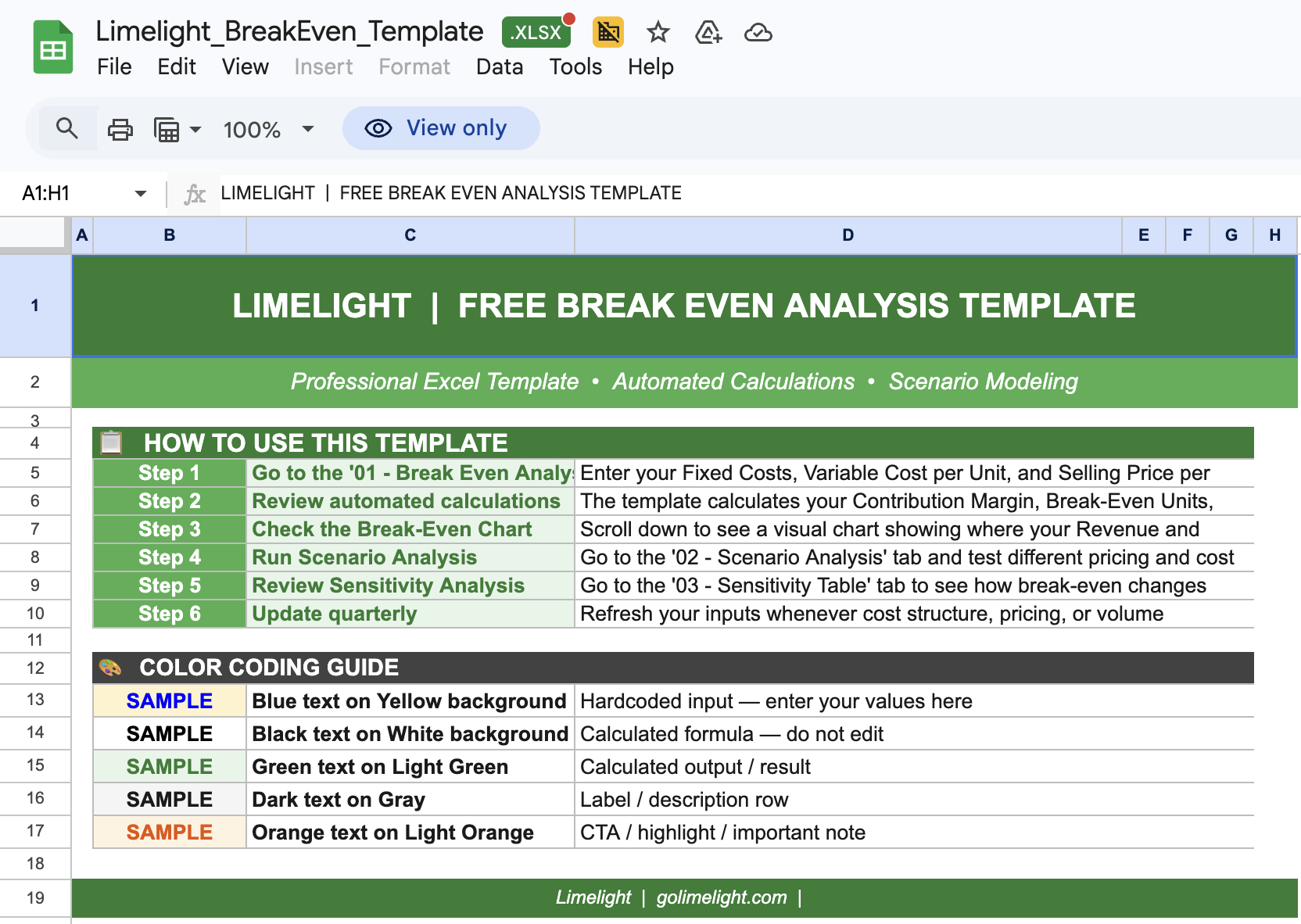
That's why Limelight created this free, professionally designed break even analysis template. It goes beyond a basic formula — it's a complete analysis tool with scenario modeling, automated calculations, and visual breakpoints built in, so you can move from data to decision in minutes.
- How to calculate your break-even point in units and in revenue dollars
- The difference between fixed costs, variable costs, and contribution margin — and why each matters
- How to build scenario models (best case, worst case, base case) around your break-even assumptions
- Best practices used by FP&A teams at high-growth companies
- Common mistakes that lead to inaccurate break-even calculations — and how to avoid them
What Is Break Even Analysis and Why You Need It
A break even analysis determines the exact point at which your total revenues equal your total costs — the break-even point. Below this point, you're operating at a loss. Above it, you're generating profit. Understanding this threshold is critical for every financial decision your organization makes.
Break-even analysis is built on three core components:
| Fixed Costs | Expenses that remain constant regardless of sales volume — rent, salaries, insurance, software subscriptions, depreciation. |
| Variable Costs | Expenses that scale directly with production or sales — raw materials, direct labor, sales commissions, packaging. |
| Contribution Margin | Selling price per unit minus variable cost per unit. This is the amount each unit sold contributes toward covering fixed costs and generating profit. |
|
Break-Even Formula Break-Even Units = Fixed Costs ÷ (Price per Unit − Variable Cost per Unit) Break-Even Revenue = Break-Even Units × Price per Unit |
Here's why finance teams prioritize break-even analysis:
- Validates pricing strategy before launch or product expansion
- Reveals the minimum sales volume needed to justify new investments
- Supports investor conversations with clear profitability timelines
- Helps set realistic revenue targets for sales and marketing teams
- Identifies the impact of cost changes on overall financial viability
- Enables side-by-side scenario comparison to stress-test assumptions
Key Benefits of Using Our Break Even Analysis Template
Limelight's template is designed for finance professionals — not just startup founders. Here's what sets it apart from a basic spreadsheet:
- Professional FP&A Design: Clean, structured layout with clearly separated inputs, calculations, and outputs — the way finance teams expect to see it.
- Automated Calculations: Enter your fixed costs, variable costs, and price — the template calculates break-even units, break-even revenue, and contribution margin automatically. No formula-building required.
- Scenario Modeling Built In: Run best-case, worst-case, and base-case scenarios side by side. See instantly how pricing or cost changes shift your break-even point — the feature competitors don't offer.
- Visual Break-Even Chart: A dynamic chart plots your revenue and total cost lines, making it easy to pinpoint the break-even crossover for stakeholder presentations and board decks.
- Multiple Analysis Views: Includes both unit-based and revenue-based break-even calculations, with a contribution margin summary for each product or business line.
- Integration Ready: Fully compatible with Microsoft Excel and Google Sheets. Structured for easy data import from your ERP or accounting system.
How to Use the Break Even Analysis Template: Step-by-Step Guide
Follow these steps to complete your break-even analysis in minutes:
Step 1 : Download and Open the Template
Download the Excel file and open it in Microsoft Excel or Google Sheets. Review the three tabs: Inputs, Analysis, and Scenario Model.
Step 2 : Enter Your Fixed Costs
List all costs that don't change with production volume — rent, salaries, software, insurance, depreciation. Enter the monthly or annual total in the Fixed Costs input section.
Step 3 : Enter Your Variable Costs Per Unit
Add costs that scale with each unit sold — materials, direct labor, packaging, commissions. Enter the per-unit cost. The template calculates total variable costs automatically at any sales volume.
Step 4 : Set Your Selling Price Per Unit
Enter the price at which each unit or service is sold. The template will instantly calculate your contribution margin per unit and contribution margin ratio.
Step 5: Review Your Break-Even Point
The Analysis tab displays your break-even in units and in revenue dollars, alongside a visual chart. If the number is higher than expected, use the Scenario tab to test pricing or cost changes.
Step 6 : Run Scenario Analysis
Adjust assumptions in the Scenario Model tab to model different pricing strategies, cost structures, or volume targets. Compare best-case, worst-case, and base-case outcomes side by side.
Best Practices for Break Even Analysis
Follow these guidelines to ensure your break-even analysis is accurate and actionable:
- Separate fixed and variable costs rigorously: The most common error in break-even analysis is misclassifying costs. Semi-variable costs (like utility bills or part-time labor) should be split appropriately before entering them into the template.
- Use current and verified cost data: Break-even analysis is only as reliable as the inputs. Pull actuals from your ERP or accounting system rather than using estimates — especially for variable cost per unit.
- Model multiple scenarios, not just one: A single break-even number creates false confidence. Always run at least three scenarios: base case, optimistic (lower costs or higher price), and pessimistic (higher costs or lower price).
- Revisit quarterly: Cost structures change. Update your break-even model at least quarterly — or whenever a major cost, pricing, or volume assumption changes — to keep decisions grounded in current reality.
- Connect to your broader financial model: Break-even analysis is most powerful when linked to your P&L, cash flow forecast, and rolling forecast. Standalone analysis misses the full picture.
- Include all product lines separately: If you sell multiple products, calculate a weighted-average contribution margin rather than blending everything into one figure. Multi-product break-even gives a more accurate read on overall profitability.
- Document your assumptions: For every key input — pricing, costs, volume — note the source and date. This makes the model auditable, shareable, and easier to update when assumptions change.
Download Your Free Break Even Analysis Template
Ready to calculate your break-even point? Download Limelight's professional template and start your analysis today.
What's Included in Your Download:
- Complete break-even analysis template with automated formulas
- Fixed costs, variable costs, and contribution margin input sections
- Unit-based and revenue-based break-even calculations
- Scenario modeling tab (best case / worst case / base case)
- Visual break-even chart for stakeholder presentations
- Pre-built structure with sample data to guide your setup
- Detailed setup instructions included
- Compatible with Microsoft Excel and Google Sheets

Need a More Powerful Break-Even & FP&A Solution?
Templates are a great starting point — but as your business grows, static spreadsheets create version control issues, manual errors, and disconnected data. Limelight's cloud-based FP&A platform takes your break-even analysis to the next level:
- Live break-even modeling connected directly to your ERP actuals (Sage Intacct, NetSuite, Microsoft Dynamics, and more)
- Dynamic scenario planning that updates across your entire financial model — P&L, cash flow, and workforce plan — when assumptions change
- Automated rolling forecasts so your break-even point always reflects current cost and revenue performance
- Collaboration workflows so your whole finance team works from one source of truth — no more emailing spreadsheet versions
- Board-ready reporting and dashboards built from your live financial data

More Templates