
%20(1).svg)
Free DCF Calculator Template: Download & Customize Today
.svg)


Valuing a company, project, or acquisition shouldn't require building a financial model from scratch. Our free DCF calculator template gives finance teams a ready-to-use Excel model that covers the entire discounted cash flow process — from revenue and margin assumptions to free cash flow projections, terminal value, and implied equity value.
In this guide you'll discover:
- What a DCF calculator is and how finance teams use it
- The key components of a DCF model — FCFF, WACC, and terminal value
- A step-by-step guide to running your own DCF analysis
- DCF modeling best practices used by FP&A teams and CFOs
- How to download and customize Limelight's free DCF calculator template
What Is a DCF Calculator and Why Finance Teams Need It
A DCF calculator — short for discounted cash flow calculator — is a financial model that estimates the present value of a business, project, or investment based on its expected future cash flows. The core idea is rooted in the time value of money: a dollar received today is worth more than a dollar received in the future, because today's dollar can be reinvested.
Finance teams use DCF analysis to:
- Evaluate potential acquisitions or capital expenditures
- Assess the intrinsic value of a business unit or division
- Justify strategic investments to the board or executive team
- Compare competing investment opportunities on an apples-to-apples basis
- Stress-test financial assumptions under different scenarios
The Core DCF Formula
Formula
|
DCF = CF₁/(1+r)¹ + CF₂/(1+r)² + CF₃/(1+r)³ + ... + CFn/(1+r)n + Terminal Value / (1+r)n Where: CF = Free Cash Flow in a given year | r = Discount Rate (WACC) | n = Forecast period (typically 5–7 years) |
Key DCF Terms
|
Term |
Definition |
|
Free Cash Flow to Firm (FCFF) |
Cash generated by operations after capex, available to all capital providers |
|
WACC |
Weighted Average Cost of Capital — the discount rate used to bring future FCFs to present value |
|
Terminal Value |
Estimated value of cash flows beyond the forecast period (perpetuity growth or exit multiple method) |
|
Net Present Value (NPV) |
Sum of all discounted future cash flows, including terminal value |
|
Enterprise Value (EV) |
Total intrinsic value of the business, including debt |
|
Equity Value |
Enterprise value minus net debt — what belongs to equity holders |
|
Implied Share Price |
Equity value divided by shares outstanding |
Key Benefits of Limelight's DCF Calculator Template
- Professional FP&A Design: Structured for finance directors, controllers, and CFOs — not just investment bankers or students. Color-coded inputs, formulas, and outputs follow industry standards.
- Built-in WACC Calculator: No more building your cost of capital model separately. The WACC tab calculates cost of equity (CAPM), cost of debt, and capital structure weights automatically.
- Dual Terminal Value Methods: Model terminal value using both the Perpetuity Growth Rate method and the Exit Multiple (EV/EBITDA) method side by side — and see the implied growth rate crosswalk.
- Sensitivity Analysis Tables: Instantly see how your Enterprise Value shifts across a range of WACC and terminal growth rate assumptions. Two sensitivity matrices included.
- Scenario Analysis (Bull / Base / Bear): Run three scenarios simultaneously with different revenue growth, margin, and exit multiple assumptions — and compare outputs in one view.
Integration Ready: Built as a standalone Excel model that bridges directly to Limelight's FP&A platform — connect your ERP data (NetSuite, Sage, Dynamics) for live inputs when you're ready to scale.
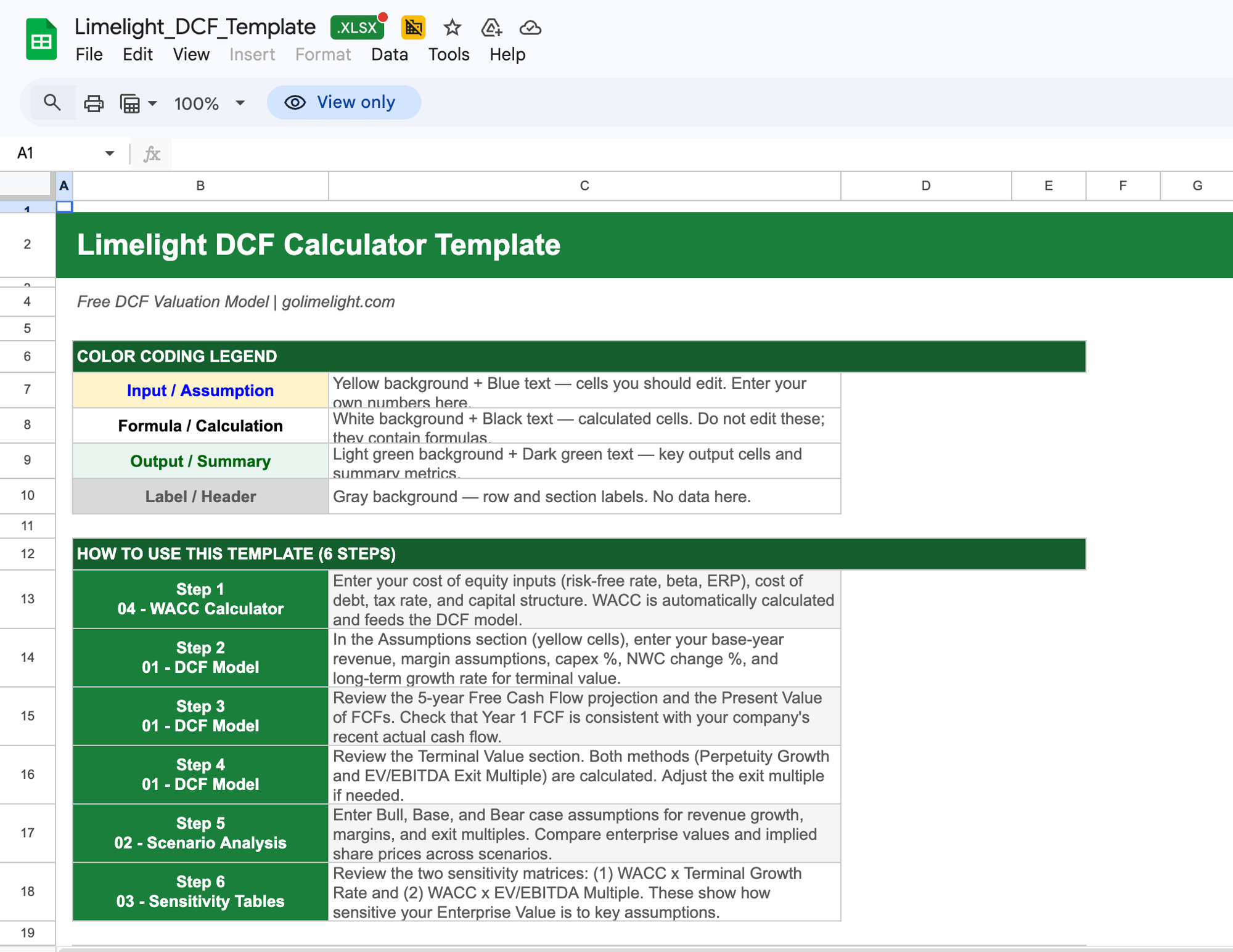
How to Use the DCF Calculator Template — Step-by-Step
|
Step 1 |
Enter Your Revenue and Growth Assumptions Start in the WACC Calculator tab to set your cost of equity (risk-free rate, beta, equity risk premium), cost of debt, tax rate, and capital structure. Your WACC automatically flows into the main model. |
|
Step 2 |
Build Your Revenue and EBITDA Projections (Years 1–5) In the main DCF tab, enter your base-year revenue, gross margin, EBITDA margin, and growth rate assumptions. The model projects revenue, EBIT, and NOPAT (Net Operating Profit After Tax) automatically. |
|
Step 3 |
Input Capex and Working Capital Assumptions Enter capex as a % of revenue and net working capital changes to calculate unlevered Free Cash Flow to Firm (FCFF) for each forecast year. |
|
Step 4 |
Review the Terminal Value Calculation The model calculates terminal value using both the Perpetuity Growth Rate (Gordon Growth) method and the EV/EBITDA Exit Multiple method. Adjust your long-term growth rate and exit multiple assumptions in the yellow input cells. |
|
Step 5 |
Run Your Scenario and Sensitivity Analysis Navigate to the Scenario tab to model Bull, Base, and Bear cases. Then use the Sensitivity tab to stress-test your Enterprise Value across a grid of WACC and terminal growth rate combinations. |
|
Step 6 |
Calculate Enterprise and Equity Value The model automatically sums the present value of forecast FCFs and terminal value to arrive at Enterprise Value. Subtract net debt and divide by shares outstanding to get implied equity value per share. |
DCF Modeling Best Practices
- Use a 5–7 Year Forecast Horizon: Avoid forecasting beyond 7 years unless you have strong visibility into the business. The further out you project, the more error compounds. Terminal value typically accounts for 60–80% of total DCF value — so getting your assumptions right matters more than extending the forecast.
- Anchor WACC to Market Data, Not Intuition: Your WACC should be derived from observable market inputs: the current risk-free rate (e.g., 10-year Treasury), an equity risk premium, a relevered beta from comparable companies, and your actual cost of debt. Hard-coding a round number is a common mistake.
- Always Use Two Terminal Value Methods: Run both the Perpetuity Growth Rate (Gordon Growth) method and an Exit Multiple method. If the implied perpetuity growth rate from your exit multiple seems unrealistically high (above 5%), reconsider your assumptions.
- Sensitize WACC and Terminal Growth Rate Together: No single DCF output should be taken at face value. Always present a sensitivity table showing enterprise value across a range of WACC (±1%) and terminal growth rate (±0.5–1%) combinations.
- Keep Hardcoded Inputs Separate from Formulas: Follow the industry color-coding convention: blue text on yellow for inputs, black text on white for formulas. Never embed assumptions inside formula cells — this makes auditing impossible.
- Reconcile FCF to Historical Cash Flow: Before finalizing your model, check that your projected FCFF in year 1 is consistent with the company's most recent actual free cash flow. Large discrepancies usually signal a modeling error.
- Use XNPV When Cash Flows Are Mid-Year: If your cash flows are generated throughout the year (rather than at year-end), use Excel's XNPV function with actual dates to apply the mid-year convention. This produces a more accurate present value than a standard NPV formula.
Download Your Free DCF Calculator Template
Limelight's free DCF calculator template is ready to use the moment you download it. Here's what's included:
- WACC Calculator tab — cost of equity (CAPM), cost of debt, and capital structure weights
- Main DCF model — 5-year free cash flow projection, PV of FCFs, and enterprise value output
- Dual terminal value calculation — Perpetuity Growth Rate and EV/EBITDA Exit Multiple
- Scenario Analysis tab — Bull, Base, and Bear case comparison with key output metrics
- Sensitivity Analysis tab — WACC × terminal growth rate matrix + WACC × exit multiple matrix
- Instructions tab — color-coding legend, formula guide, and step-by-step setup notes
- Pre-filled example data — replace with your own assumptions to get started immediately

Need a More Powerful DCF & FP&A Solution?
Limelight's DCF calculator template is a great starting point — but finance teams running ongoing valuations and planning cycles need more than a static spreadsheet. Limelight's cloud FP&A platform connects directly to your ERP and automates the inputs that feed your financial models:
- Live ERP data from NetSuite, Sage Intacct, Microsoft Dynamics, and 10+ other systems
- Automated rolling forecasts that update your revenue and cost projections in real time
- Built-in scenario and what-if modeling without rebuilding a new spreadsheet for every case
- AI-powered forecasting and variance analysis surfaced directly in your model
- Collaborative planning workflows so finance, operations, and leadership work from the same numbers


More Templates