
%20(1).svg)
Free Grant Budget Template │ Download Excel & Google Sheets
.svg)


A weak grant budget can sink an otherwise strong proposal. Reviewers cross-check every line in your budget table against your work plan and your narrative - and inconsistencies, math errors, or vague indirect cost calculations are among the top reasons proposals get sent back for revision or scored down. Limelight's free grant budget template gives grant writers, nonprofit finance leads, and sponsored programs offices a ready-to-use Excel and Google Sheets model that mirrors the federal SF-424A budget categories, auto-calculates Modified Total Direct Costs (MTDC) and indirect costs, projects multi-year budgets with escalation, and pairs every line item with a budget narrative.
In this guide you'll discover:
- What a grant budget is and why funders scrutinize it line by line
- The federal SF-424A budget categories every grant writer should know
- How to calculate direct costs, MTDC, and indirect costs correctly
- A step-by-step guide to building your grant budget
- Grant budget best practices used by experienced grant writers and finance teams
- How to download and customize Limelight's free grant budget template
What Is a Grant Budget and Why Funders Scrutinize It
A grant budget is the financial roadmap of a grant proposal. It is a detailed table showing every dollar you are requesting from a funder, organized into categories the funder requires, paired with a written narrative explaining how each number was calculated and why each cost is necessary. Strong grant budgets win over reviewers because they are realistic, transparent, internally consistent with the work plan, and fully compliant with the funder's rules. Weak grant budgets get rejected, scored down, or negotiated downward after award.
Grant budgets are structured differently from operating budgets in three key ways:
- Categories are dictated by the funder: Federal grants use the SF-424A object class categories. Foundation grants may have their own form. Either way, you do not invent categories - you map your costs into the funder's framework.
- Direct vs indirect costs is the central distinction: Direct costs are tied to the specific project (project staff, supplies, travel). Indirect costs are shared organizational overhead (rent, accounting, executive oversight) that benefit the whole organization.
- Every line needs a justification: Most funders require a budget narrative - a paragraph for each line explaining the cost, how it was calculated, and why it is necessary.
Key Grant Budget Terms
| Term | Definition |
|---|---|
| Direct Costs | Costs that can be identified specifically with a particular project - project staff, supplies, project-related travel, contractual services. |
| Indirect Costs (F&A) | Shared organizational overhead that supports multiple projects - rent, utilities, accounting, executive oversight. Also called Facilities & Administrative (F&A) costs. |
| MTDC (Modified Total Direct Costs) | The base used to calculate indirect costs. Per 2 CFR 200.1, MTDC excludes equipment, capital expenditures, patient care, rental costs, tuition, scholarships, participant support costs, and the portion of each subaward above $50,000. |
| NICRA | Negotiated Indirect Cost Rate Agreement - a formal agreement with your federal cognizant agency that sets your indirect rate. Used when available. |
| De Minimis Rate | A default indirect cost rate of up to 15% of MTDC, available to organizations without a NICRA. Per 2 CFR 200.414(f), increased from 10% effective October 1, 2024. |
| Cost Share / Match | Funds or in-kind contributions the applicant commits to the project beyond the federal request. Some funders require it; others encourage it. |
| Budget Narrative | The written companion to your budget table. Justifies each line item, shows your math, and explains why the cost is necessary. |
| NOFO | Notice of Funding Opportunity - the funder's published announcement that specifies eligibility, deadlines, allowable costs, and required budget format. |
| Allowable / Allocable / Reasonable | Three federal cost principles. A cost must meet all three tests to be charged to a federal award. |
| Net Surplus / (Deficit) | Total revenue minus total expenses - nonprofits typically aim for a slightly positive number |
The Federal SF-424A Budget Categories Explained
The SF-424A Budget Information for Non-Construction Programs form is the standard federal grant budget structure. Most foundation grant applications use a simplified version of the same categories, so building your budget around SF-424A makes it portable across funders.
- Personnel (Line 6a): Salaries and wages of project staff who are direct employees of the applicant organization. Enter base annual salary × percent of time devoted to the project.
- Fringe Benefits (Line 6b): Benefits and payroll taxes for personnel - FICA, healthcare, retirement, paid leave, unemployment insurance. Typically calculated as a percentage of personnel salaries using your organization's actual fringe rate.
- Travel (Line 6c): Project-related travel for project staff - conference attendance, site visits, required grantee meetings. Identify domestic and foreign travel separately. Use federal per diem rates for cost estimates.
- Equipment (Line 6d): Tangible items with a per-unit cost of $10,000 or more and a useful life of more than one year. Items below the $10,000 threshold are classified as Supplies. The 2024 update to 2 CFR Part 200 raised this threshold from $5,000 to $10,000, effective October 1, 2024 (2 CFR 200.313).
- Supplies (Line 6e): Consumable items used during the project period - program materials, office supplies, software licenses, and computer hardware under the $10,000 equipment threshold.
- Contractual (Line 6f): Consultants and subawards. Per 2 CFR 200.1, the first $50,000 of each subaward is included in MTDC for indirect cost calculation; any amount above $50,000 per subaward is excluded. This threshold was also raised from $25,000 in the 2024 update.
- Construction (Line 6g): Used only for construction grants. Most non-construction proposals leave this blank.
- Other (Line 6h): Direct costs that do not fit elsewhere - printing, telecommunications, dues and subscriptions, participant incentives, project-specific insurance.
- Indirect Charges (Line 6j): Indirect costs calculated by applying your indirect cost rate to your MTDC base. If you have a Negotiated Indirect Cost Rate Agreement (NICRA) with a federal agency, use that rate. If not, you may elect the de minimis rate of up to 15% of MTDC per 2 CFR 200.414(f).
Direct vs Indirect Costs - How to Tell Them Apart
The simplest test: ask whether a cost would exist if the project disappeared. If yes, it is likely indirect. If no, it is direct.
Examples of Direct Costs
- Salary of a Program Manager whose entire job is delivering the grant-funded program
- Curriculum materials given directly to program participants
- Travel by project staff to a required grantee convening
- Fees paid to an external evaluator hired specifically for this project
- Software license purchased solely for project data collection
Examples of Indirect Costs
- Rent and utilities for your organization's headquarters
- Salary of your Executive Director, CFO, or HR staff
- Annual financial audit and accounting software
- General liability insurance, D&O insurance
- IT infrastructure that serves all programs
Indirect costs are calculated by applying your indirect cost rate to your MTDC base. Most organizations choose between two options. If you receive direct federal funding, you may negotiate a NICRA with your cognizant federal agency, which sets a custom rate based on your actual cost structure. If you don't have a NICRA, you may elect the federal de minimis rate of up to 15% of MTDC - a simple default rate that requires no documentation to justify per 2 CFR 200.414(f). The de minimis rate was raised from 10% to 15% as part of the 2024 OMB Uniform Guidance update, effective for awards issued on or after October 1, 2024.
Key Benefits of Limelight's Grant Budget Template
- Built on the SF-424A Federal Framework: All eight object class categories (Personnel, Fringe, Travel, Equipment, Supplies, Contractual, Other, Indirect Costs) are pre-built and pre-formatted. Works for federal, state, and most foundation grant applications.
- Auto-Calculated MTDC and Indirect Costs: The template excludes equipment and the portion of subawards over $50,000 from MTDC automatically, then applies your indirect cost rate. No manual calculation required - and the federal de minimis rate of up to 15% is pre-loaded.
- Single-Year and Multi-Year Budgets: Build your detailed Year 1 budget on one tab, then auto-project Years 2-5 with separate escalation assumptions for personnel and non-personnel costs.
- Cost-Share and Match Tracking: Dedicated tab for federal request vs non-federal contributions, with cash and in-kind columns separated for funders that require match documentation.
- Paired Budget Narrative: A built-in Budget Narrative tab pre-populates with line-by-line justifications. Edit the language to match your project, then submit alongside the budget table - reviewers cross-check these against each other.
- Integration Ready: Standalone Excel and Google Sheets file that bridges directly to Limelight's FP&A platform for nonprofits - connect your QuickBooks, Sage Intacct, NetSuite, or Blackbaud data for live grant budget vs actual reporting once the award is in place.
How to Use the Grant Budget Template - Step-by-Step
Step 1: Read the Funder's NOFO Before You Open the Template
Every grant has a Notice of Funding Opportunity (federal) or solicitation document (foundation) that specifies allowable costs, cost caps, indirect cost rules, required match, and the exact budget format. Read it twice before building your budget - this is where most rework comes from.
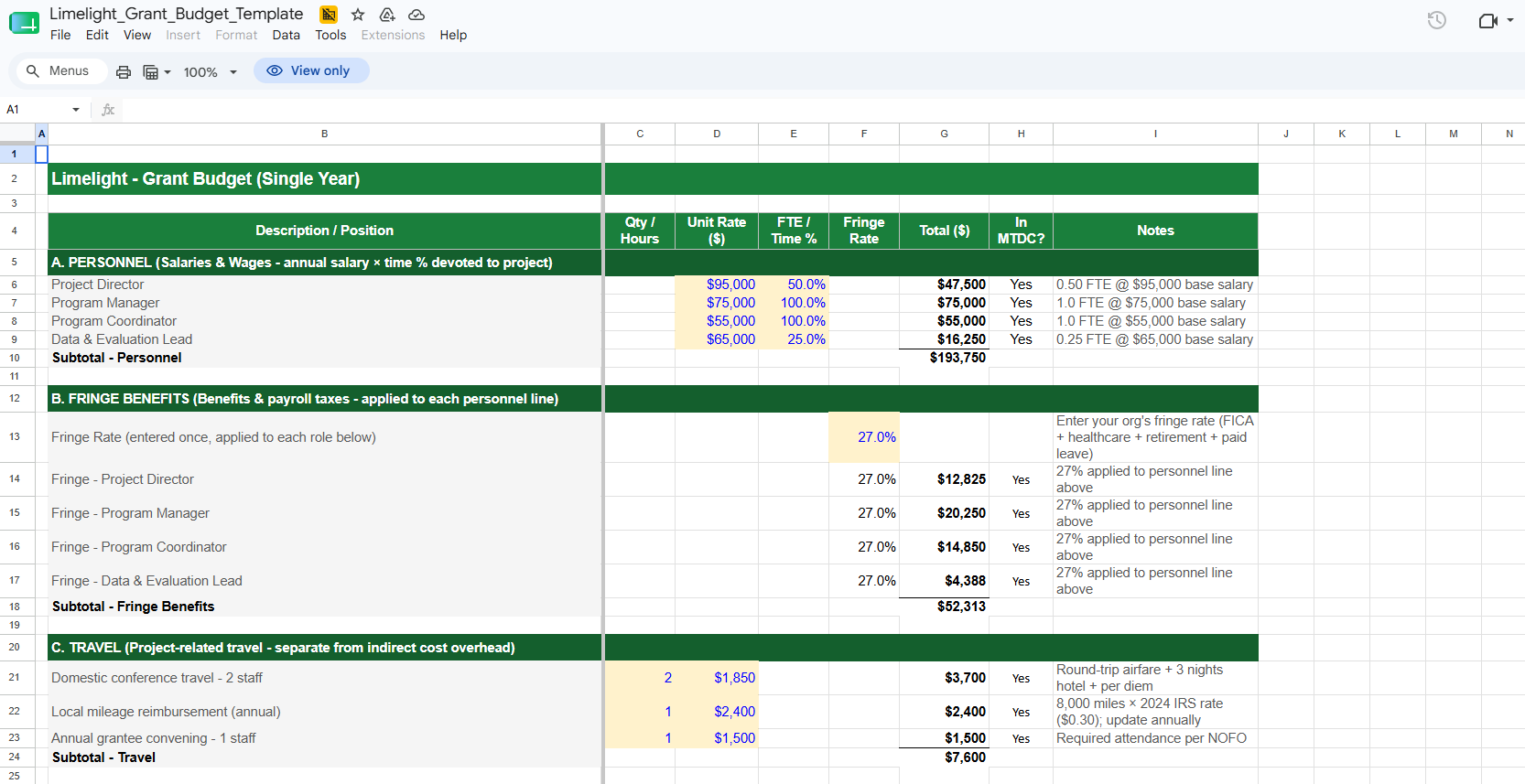
Step 2: Build Personnel and Fringe Benefits (Tab: 01 - Single-Year Budget)
In Section A, enter each role's annual base salary and the percent of time (FTE) the person will devote to the project. The template auto-calculates each personnel total. In Section B, enter your organization's actual fringe rate once - it applies to all personnel lines automatically.
Step 3: Enter Travel, Equipment, Supplies, Contractual, and Other Costs
Work through Sections C through G. The template flags whether each cost belongs in MTDC. Remember: items at $10,000 per unit or above go in Equipment (excluded from MTDC). Items under $10,000 go in Supplies (included in MTDC). Subawards above $50,000 per partner have the excess excluded from MTDC.
Step 4: Apply Your Indirect Cost Rate
In Section J, enter your indirect cost rate. If you have a NICRA, use that rate. If you don't, the federal de minimis rate of up to 15% is the simplest option. The template auto-calculates MTDC, then applies your rate to produce total indirect costs.
Step 5: Project Multi-Year Costs (Tab: 02 - Multi-Year Budget)
If your grant covers multiple years, enter annual escalation rates for personnel (typically 2-4% for cost-of-living adjustments) and non-personnel costs (typically 2-3% for inflation). The template projects Years 2-5 automatically and calculates the full multi-year project total.
Step 6: Document Cost-Share (Tab: 03 - Cost-Share & Match)
If the funder requires match, enter your non-federal cash and in-kind contributions by category. The template calculates the federal-to-total ratio and the match as a percentage of the federal request - both standard reporting metrics for federal grants.
Step 7: Write the Budget Narrative (Tab: 04 - Budget Narrative)
Every line in your budget table needs a 1-3 sentence justification: what the cost is for, how you calculated it, and why it is necessary for the project. The template pre-populates a justification for each line item - edit each one to reflect your actual project before submitting.
Grant Budget Best Practices
Mirror Your Work Plan Exactly:
Every activity in your project work plan should have a matching cost in your budget. Every cost in your budget should support an activity in the work plan. Reviewers cross-check these two documents - orphan costs or unfunded activities are red flags.
Budget What You Need, Not What's Available:
If the maximum award is $500,000 and your legitimate costs total $420,000, submit the $420,000 budget. Reviewers and grants management specialists can recognize padded budgets, and agencies prefer realistic asks over inflated ones that need to be negotiated down.
Apply the Three Federal Cost Tests:
Every cost on a federal award must be allowable (permitted by the funder's rules), allocable (benefits the project in proportion to the charge), and reasonable (a prudent person would have incurred the cost). These tests come from 2 CFR Part 200, Subpart E and apply to every line in your budget.
Get Your Equipment and Subaward Thresholds Right:
The 2024 OMB Uniform Guidance update raised the equipment threshold from $5,000 to $10,000 per unit and the MTDC-includable subaward portion from $25,000 to $50,000 per subaward. Many older online templates and PDFs still cite the old thresholds - always verify against the current eCFR text of 2 CFR 200.1.
Use the De Minimis Rate If You Don't Have a NICRA:
Many smaller nonprofits leave indirect cost recovery on the table because they think they need a negotiated rate. They don't. The federal de minimis rate of up to 15% of MTDC is available to any organization without a current federally negotiated rate, requires no documentation, and is honored by all federal agencies.
Build the Budget Narrative as You Build the Budget:
Don't wait until the budget table is finalized to write the narrative. As you enter each line item, draft one or two sentences explaining the cost. Limelight's template pairs the narrative directly with the budget so the two stay in sync.
Plan for the Single Audit Threshold:
If your organization expends $1,000,000 or more in federal funds in a single fiscal year, you trigger a Single Audit under 2 CFR 200.501. This threshold was raised from $750,000 in the 2024 update. Budget for audit costs accordingly if a new grant will push you over the line.
Limelight's free grant budget template is ready to use the moment you download it. Here's what's included:
- Instructions tab - color-coding legend, seven-step setup guide, and a reference table of current federal thresholds (de minimis rate, equipment, subawards, Single Audit)
- Single-Year Budget tab - all eight SF-424A categories with pre-built line items, auto-calculated fringe benefits, MTDC, and indirect costs
- Multi-Year Budget tab - up to 5 years with separate personnel and non-personnel escalation assumptions
- Cost-Share & Match tab - federal vs non-federal cost split with cash and in-kind columns
- Budget Narrative tab - pre-populated line-by-line justifications you can edit in place
- Pre-loaded with current federal thresholds (15% de minimis, $10K equipment, $50K subaward) per the 2024 Uniform Guidance update
- Compatible with both Microsoft Excel and Google Sheets

Need a More Powerful FP&A Solution for Grant Management?
Limelight's grant budget template is a great starting point - but organizations managing multiple active grants, multi-year awards, and complex cost allocations need more than a static spreadsheet.Limelight's cloud FP&A platform is built for nonprofit finance teams who need to track grant budgets against actuals in real time:
Live data from QuickBooks, Sage Intacct, NetSuite, Blackbaud, Microsoft Dynamics, and other accounting systems
- Grant-by-grant budget vs actual reporting with drill-down to the transaction level
- Multi-year grant tracking with restricted-fund segregation
- Cost allocation models that split shared expenses across multiple grants automatically
- Custom dashboards for program officers, finance leadership, and the board
- Collaborative budget workflows so program leaders, finance, and the executive director work from the same numbers

More Templates