
%20(1).svg)
Free Nonprofit Budget Template: Download Excel & Google Sheets
.svg)


Running a nonprofit on a static spreadsheet you built from scratch is risky - one broken formula and your board meeting is derailed. Limelight's free nonprofit budget template gives finance directors, executive directors, and board treasurers a ready-to-use Excel and Google Sheets model that covers the entire annual budgeting cycle - from revenue forecasting across grants, donations, and fundraising events to expense planning by Form 990 functional category.
In this guide you'll discover:
- What a nonprofit budget is and why it's structured differently from a for-profit budget
- The revenue and expense categories every 501(c)(3) should track
- A step-by-step guide to building your annual operating budget
- Nonprofit budgeting best practices used by experienced finance directors and CFOs
- How to download and customize Limelight's free nonprofit budget template
What Is a Nonprofit Budget and Why It's Different
A nonprofit budget is an annual financial plan that projects an organization's revenue and expenses across its fiscal year - but unlike a for-profit budget, it isn't designed around maximizing profit. It's designed to ensure that every dollar raised is allocated to mission delivery, that restricted funds are spent on their intended purpose, and that the organization maintains a balanced or modestly positive financial position to sustain operations.
Nonprofit budgets differ from for-profit budgets in four key ways:
- Revenue is unpredictable: Donations, grants, and event income vary year to year, so forecasting is inherently less precise than recurring B2B revenue.
- Funds are often restricted: Donor-restricted revenue can only be spent on the program or purpose specified by the funder - a critical distinction for board reporting and audit compliance.
- Expenses are reported by function, not just by type: On the IRS Form 990, Part IX (Statement of Functional Expenses), filers report expenses across three functional categories - Program Services, Management & General, and Fundraising. Most nonprofits structure their budget the same way for consistency with annual reporting.
- Stakeholders include funders and boards, not shareholders: Budgets must be transparent and defensible to donors, foundations, and the board of directors.
Key Nonprofit Budget Terms
| Term | Definition |
|---|---|
| Operating Budget | Annual plan of all expected revenue and expenses for an organization's fiscal year |
| Program Budget | Budget for a single program or initiative, showing direct and allocated costs |
| Restricted Funds | Revenue that must be spent for a specific purpose designated by the donor or grantor |
| Unrestricted Funds | Revenue the organization can use for any mission-aligned purpose |
| Functional Expenses | Expenses categorized by purpose: Program Services, Management & General, or Fundraising |
| Form 990 | The annual information return most tax-exempt nonprofits must file with the IRS |
| Program Services Ratio | Program Services expenses as a % of total expenses - a key watchdog metric |
| Fundraising Efficiency | Dollars raised per dollar of fundraising expense - a measure of how efficiently a nonprofit converts fundraising spend into contributions |
| Budget vs Actual | Monthly or quarterly comparison of budgeted figures against actual financial results |
| Net Surplus / (Deficit) | Total revenue minus total expenses - nonprofits typically aim for a slightly positive number |
Nonprofit Budget Categories - Revenue and Expenses
Every nonprofit budget is organized around two sides: revenue (where the money comes from) and expenses (where it goes). Below are the standard categories used by experienced nonprofit finance teams and aligned with IRS Form 990 reporting.
Revenue Categories
- Individual donations: Gifts from individuals, including small recurring donors and one-time givers.
- Major gifts: Larger gifts from major donors - the specific threshold varies by organization, but is often set somewhere in the range of $1,000 to $10,000 and above. Track separately for cultivation strategy.
- Foundation grants: Restricted or unrestricted grants from private and community foundations.
- Government grants: Federal, state, and local government grants and contracts.
- Corporate sponsorships: Cash sponsorships from corporate partners, often tied to events or programs.
- Fundraising events: Gross revenue from galas, auctions, peer-to-peer fundraisers, and other events.
- Membership dues: Recurring revenue from organizational members (if applicable).
- Program service fees: Earned revenue from services delivered to beneficiaries or clients.
- In-kind contributions: Fair market value of donated goods, services, or volunteer time.
- Investment income: Interest, dividends, and gains on operating reserves or endowment funds.
Expense Categories (Form 990 Functional Framework)
The IRS Form 990, Part IX (Statement of Functional Expenses) presents expenses across three functional categories. Most nonprofit budgets follow the same structure:
- Program Services: Costs directly related to delivering your mission - program staff salaries, supplies, contractors, program-related travel, and the portion of rent and technology allocated to program delivery.
- Management & General: Administrative and overhead costs - executive compensation, accounting and audit fees, insurance, board governance, and the admin portion of rent and utilities.
- Fundraising: Costs of donor acquisition and cultivation - development staff, donor CRM, direct mail, fundraising events (direct expenses), and grant writing.
Key Benefits of Limelight's Nonprofit Budget Template
Built for Nonprofit Finance Teams:
Structured for finance directors, executive directors, and board treasurers - not generic small-business operators. Color-coded inputs, formulas, and outputs follow nonprofit accounting conventions.
Form 990-Aligned Functional Categories:
Expenses are pre-organized into Program Services, Management & General, and Fundraising - so your budget doubles as a starting point for audit prep and 990 filing.
Five Connected Worksheets:
Instructions, Annual Budget, Monthly Detail, Program-Based Budget, and Budget vs Actual - all linked so updates flow automatically.
Built-in Key Ratios:
The Annual Budget tab automatically calculates Program Services %, M&G %, Fundraising %, Fundraising Efficiency, and Operating Margin - the financial ratios most commonly used in nonprofit financial reporting and watchdog evaluations.
Monthly Cash Flow Visibility:
The Monthly Detail tab includes a Cumulative Net Surplus row so you can spot cash crunches before they hit.
Program-Level Allocation:
Track up to four individual programs side by side with Management & General and Fundraising columns - exactly how the IRS reports it on Form 990 Part IX.
Integration Ready:
Built as a standalone Excel and Google Sheets file that bridges directly to Limelight's FP&A platform - connect your QuickBooks, Sage Intacct, or NetSuite data for live actuals when you're ready to scale.
How to Use the Nonprofit Budget Template - Step-by-Step
Step 1: Start with Your Annual Goals and Programs
Before opening the template, list out what your nonprofit plans to accomplish next year - the programs you'll run, the people you'll serve, and the staffing required. Your budget is the financial expression of your strategic plan, so the plan comes first.
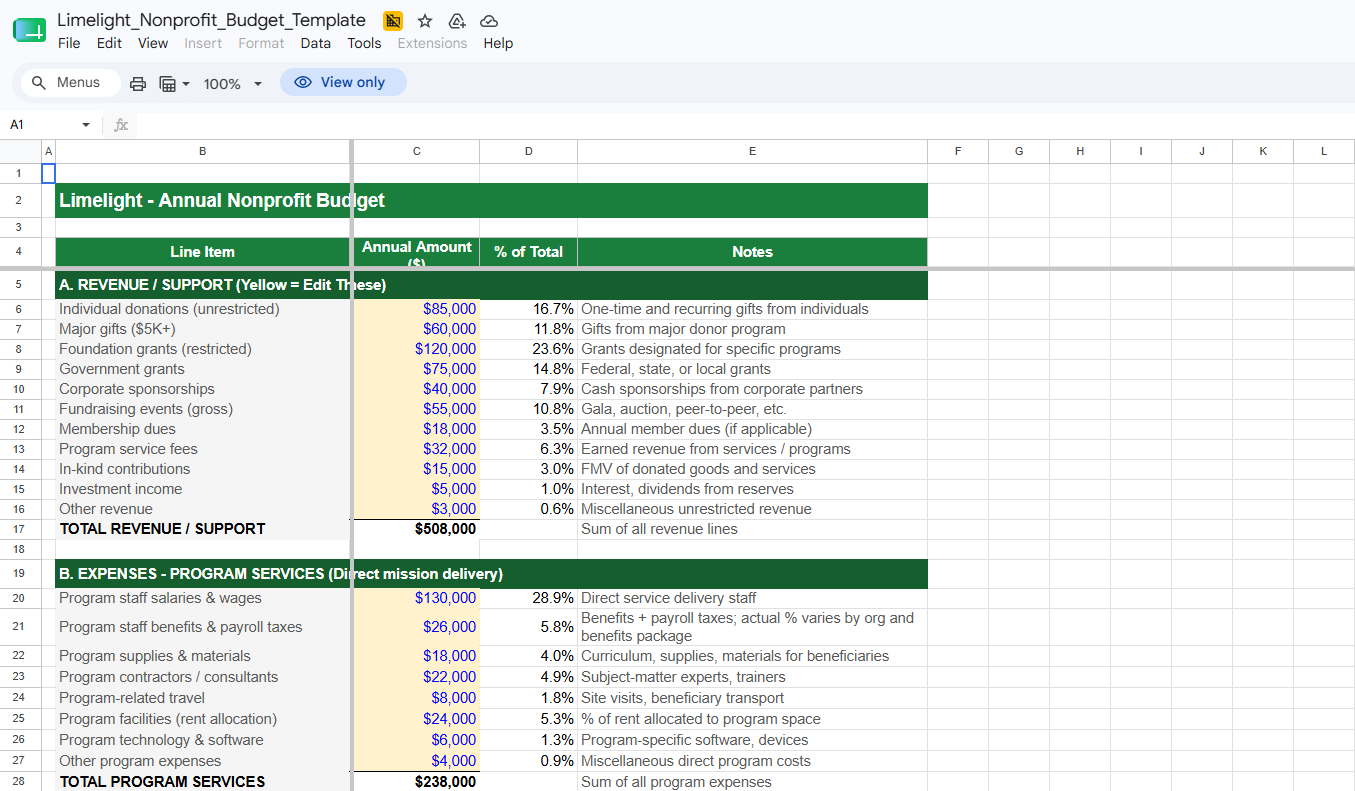
Step 2: Build Your Annual Revenue Forecast (Tab: 01 - Annual Budget)
In the yellow input cells under Section A, enter your projected revenue for each funding source - individual donations, foundation grants, government grants, corporate sponsorships, fundraising events, and so on. Be conservative; it's better to come in over budget than to face a mid-year shortfall.
Step 3: Allocate Expenses by Functional Category (Tab: 01 - Annual Budget)
In Sections B, C, and D, enter your projected expenses across Program Services, Management & General, and Fundraising. The model automatically totals each category and calculates the key Form 990 ratios at the bottom of the tab.
Step 4: Break the Budget Down by Month (Tab: 02 - Monthly Detail)
The Monthly Detail tab starts with each annual line spread evenly across 12 months. Adjust the monthly values to reflect timing patterns - large grants often arrive in specific months, gala revenue lands in one or two months, and salaries are relatively steady. The Cumulative Net Surplus row at the bottom shows when cash gets tight.
Step 5: Allocate Across Programs (Tab: 03 - Program-Based Budget)
In the Program-Based Budget tab, distribute revenue and expenses across up to four individual programs plus Management & General and Fundraising columns. This is the structure used in Form 990 Part IX, and it's also how major funders want to see program-level financials.
Step 6: Track Actuals Monthly (Tab: 04 - Budget vs Actual)
Once your fiscal year begins, enter your year-to-date actuals in the yellow column. The model auto-calculates dollar variance, percent variance, and flags every line as 'On track' or 'Over budget' (for expenses) or 'On track' or 'Behind' (for revenue). Bring this tab to monthly board meetings.
Nonprofit Budgeting Best Practices
Start Planning Before the Fiscal Year Begins:
Most nonprofit finance teams begin the budgeting process several months ahead of the new fiscal year. The cycle typically includes an initial draft from the executive director and finance lead, program input from each program manager, finance committee review, and full board approval.
Forecast Revenue Conservatively:
Use a multi-year historical average for each recurring revenue source as your starting point. It is generally easier to deliver a year-end surplus than to issue mid-year program cuts to close a revenue gap.
Track Your Program Expense Ratio:
Two widely cited watchdog benchmarks exist. The BBB Wise Giving Alliance, under its Standard 8, expects at least 65% of total expenses to go toward program activities. Charity Navigator's current Encompass Rating System awards full points to organizations whose program expense ratio is 70% or higher (averaged over the three most recent Form 990 filings) and zero points to those below 50%.
Watch Your Fundraising Efficiency:
The BBB Wise Giving Alliance's Standard 9 expects fundraising expenses to be no more than 35% of related contributions. Industry rule-of-thumb benchmarks place efficient fundraising at roughly $0.20 or less spent per dollar raised, though appropriate ratios vary by organization size, age, and fundraising mix.
Separate Restricted from Unrestricted Funds:
Donor-restricted revenue (for example, a foundation grant designated for a specific program) can only be spent on its designated purpose. Track restricted and unrestricted revenue separately, and never apply restricted funds to general operating expenses without explicit donor approval.
Build Toward an Operating Reserve:
The Nonprofit Operating Reserves Initiative (NORI) recommends a minimum operating reserve of three months of the annual operating expense budget. The National Council of Nonprofits and Candid both reference a commonly cited reserve goal of three to six months of operating expenses. If you are below that, consider building a planned annual surplus into your budget.
Get Board Approval in Writing:
Your board has fiduciary responsibility for the budget. Present the proposed budget at a board meeting, document approval in the minutes, and re-present any significant mid-year reforecasts.
Review Monthly, Reforecast as Needed:
Run a budget-vs-actual review every month with the executive director and treasurer. If actuals diverge materially from budget on a major line, build a formal reforecast and bring it to the board.
Download Your Free Nonprofit Budget Template
Limelight's free nonprofit budget template is ready to use the moment you download it. Here's what's included:
- Instructions tab - color-coding legend, six-step setup guide, and sheet-by-sheet overview
- Annual Budget tab - 11 revenue lines + 27 expense lines across Program Services, M&G, and Fundraising
- Monthly Detail tab - 12-month breakdown of every line item with auto-summing annual totals and a cumulative net surplus row
- Program-Based Budget tab - Form 990-style allocation across four program columns plus M&G and Fundraising
- Budget vs Actual tab - YTD actuals tracker with auto-calculated variance dollars, variance %, and status flags
- Built-in key ratios - Program Services %, M&G %, Fundraising %, Fundraising Efficiency, Operating Margin
- Pre-filled example data - replace with your own assumptions to get started immediately

Need a More Powerful FP&A Solution for Your Nonprofit?
Limelight's nonprofit budget template is a great starting point - but mission-driven organizations running multiple programs and reporting to a board and funders need more than a static spreadsheet. Limelight's cloud FP&A platform connects directly to your accounting system and automates the inputs that feed your budget:
- Live data from QuickBooks, Sage Intacct, NetSuite, Microsoft Dynamics, and 10+ other systems
- Automated rolling forecasts that update your revenue and expense projections in real time
- Program-level reporting that aligns with Form 990 and your grant reporting requirements
- Restricted vs unrestricted fund tracking built into the platform - no more manual reconciliation
- Collaborative planning workflows so finance, program leaders, and the executive director work from the same numbers
More Templates