

By Limelight Team |
Last Updated: November 23, 2026

Nonprofit finance teams often have the accounting data they need but still spend significant time preparing it for board reporting. Financial Edge NXT can provide the posted transactions, ledger actuals, funds, programs, departments, grants, and other accounting dimensions. Finance then has to decide how those results should be grouped, compared with the approved budget or forecast, and explained to the board.
A more controlled process separates the accounting record from the reporting work built around it. Financial Edge NXT remains the source of accounting actuals and period-close information. Limelight integrates with it to handle account mappings, plan comparisons, variance analysis, operational explanations, and recurring board reports.
This guide explains how nonprofit finance teams can structure that process, where export-and-spreadsheet reporting creates control risks, how Financial Edge NXT and Limelight can fit into the workflow, and which governance controls help keep recurring fund accounting, planning, forecasting, and board reporting traceable.
A recurring nonprofit board report should give directors enough financial and operational context to assess:
The report usually includes five key elements:
The level of detail should match the board's responsibilities and the nonprofit's operating model. For example, a nonprofit with multiple programs, entities, grants, or restricted funds may need additional views to explain where results are coming from. Include these dimensions when they help the board understand a financial result or decision.
Funds, grants, programs, departments, and entities should not be treated as interchangeable categories. The board report should use the dimensions that explain the organization's financial performance and outlook while retaining a traceable connection to the underlying accounting records.
The report should also distinguish between what happened, why it happened, and what management expects to happen next. For example, a program may be $50,000 below its expense budget because several planned hires started later than expected. The financial result is the $50,000 underspend.
The explanation for the underspend is delayed hiring. The forward-looking question is whether those positions will be filled later in the year and whether the forecast should change.
The structure keeps the board report focused on decisions rather than data volume. It also gives finance a consistent basis for collecting commentary, reviewing variances, and updating the forecast from one reporting cycle to the next.
A Financial Edge NXT export gives finance the accounting data behind the report. It does not necessarily match the structure a board needs to review financial performance. Finance may still need to group accounts, add budget or forecast comparisons, identify material variances, and collect explanations from budget owners.
Finance typically takes four steps to turn the export into a board-ready report:
An exported set of natural accounts may need to roll into board-level lines such as program services, fundraising, administration, revenue, and operating expenses.
Finance may also need separate views for programs, departments, grants, funds, or entities when those differences help explain the results. For example, a board may need to see whether a change in program spending comes from one program rather than from overall operating performance.
The export also needs a defined comparison. Finance may place actual results against the approved budget or current forecast, depending on the reporting cycle.
The selected version should remain consistent across the report. If one page uses the approved budget and another uses a revised forecast, the board can end up comparing variances that do not use the same baseline.
The accounting data shows the amount and the period, but it may not explain why the result differs from plan. The explanation usually comes from the relevant budget owner.
For example, a program expense that is below budget could reflect delayed hiring, a postponed activity, or lower program volume. Finance can then connect the operational explanation to the reported variance and show whether it affects the forecast.
These steps turn the export into a recurring reporting process. Finance may use a spreadsheet to maintain account mappings, add comparison calculations, gather commentary, prepare charts, and assemble the board package.
A Financial Edge NXT export provides the accounting data, but finance still needs to structure, compare, explain, review, and present it before it is ready for the board.
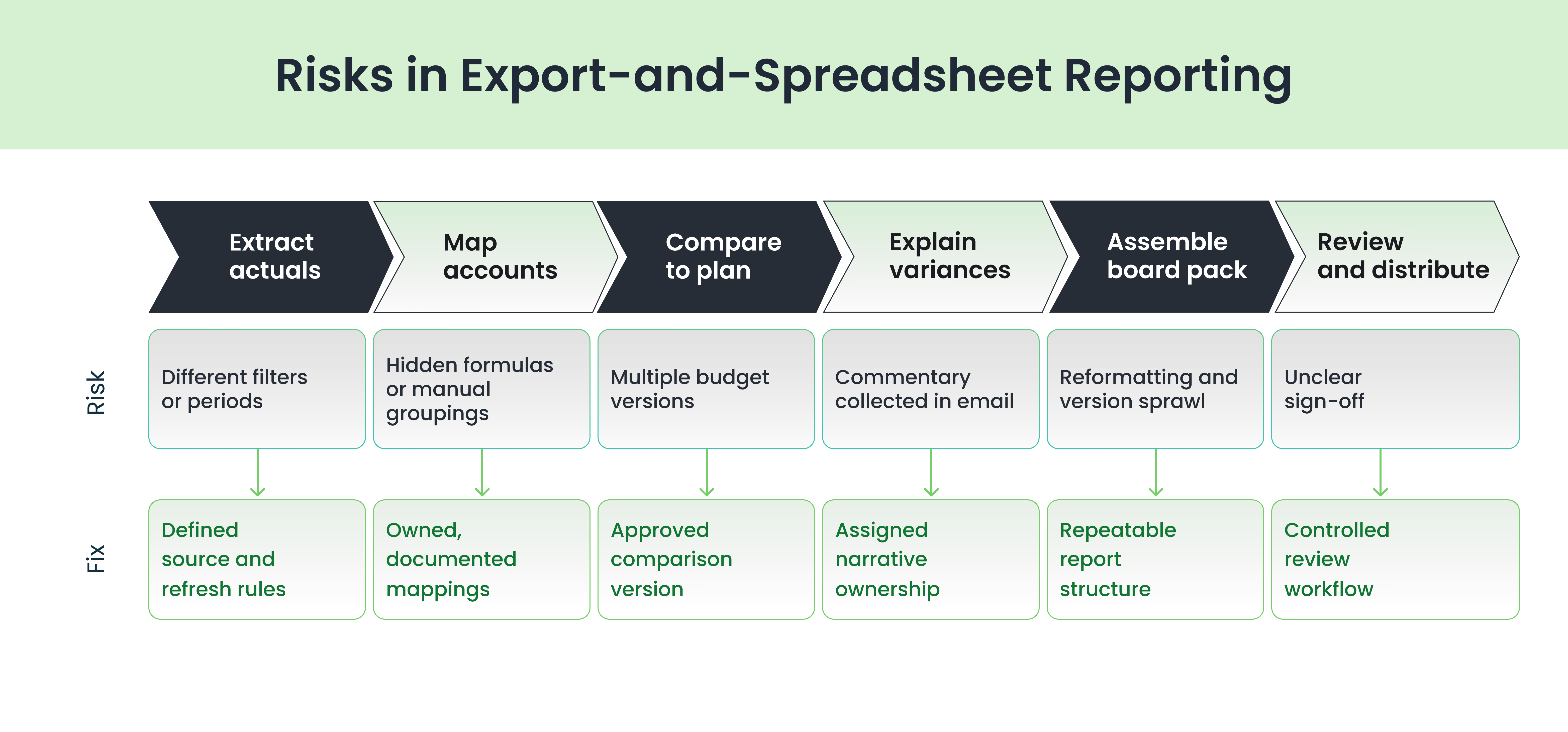
The export-and-spreadsheet process breaks down when recurring reporting logic depends on manual steps that are difficult to trace, assign, and reproduce. Recurring spreadsheet-based reporting can create challenges with frequent data transfers, account mappings, plan versions, variance commentary, and approval.
|
Reporting step |
Export-and-spreadsheet risk |
Governed reporting requirement |
|
Extract actuals |
Different filters or periods |
Defined source and refresh rules |
|
Map accounts |
Hidden formulas or manual groupings |
Owned, documented mappings |
|
Compare to plan |
Multiple budget versions |
Approved comparison version |
|
Explain variances |
Commentary collected in email |
Assigned narrative ownership |
|
Assemble board pack |
Reformatting and version sprawl |
Repeatable report structure |
|
Review and distribute |
Unclear sign-off |
Controlled review workflow |
Common spreadsheet risks and requirements for governed nonprofit reporting
The recurring process creates four common control and reporting problems:
These issues make a recurring board-reporting process harder to trace and reproduce. A reconciliation can confirm that totals are accurate. However, it does not establish who owns a mapping, which plan version was used, or whether the variance explanation was approved.
A connected workflow gives finance a defined path from posted Financial Edge NXT actuals to the reviewed board report. Each stage has an owner, a defined input, and a clear connection to the next stage.
Financial Edge NXT remains the source for posted transactions, ledger balances, accounting classifications, and close controls. Before reporting begins, finance defines the data that will feed the board report.
The reporting source should specify:
|
Reporting control |
Example |
|
Period |
September 2026 month-end |
|
Ledger/source |
Agreed Financial Edge NXT ledger |
|
Entities |
Consolidated nonprofit or selected entities |
|
Accounting dimensions |
Relevant programs, departments, funds, grants, or other dimensions |
|
Reconciliation point |
Report totals reconciled to agreed ledger balances |
Key controls for defining the accounting data used in board reporting
This gives the reporting process a defined starting point. If the source period or filters change, the report should reflect that change rather than silently using a different extract.
The board report does not need to reproduce the Financial Edge NXT chart of accounts. Finance can map accounting detail into the categories used for management reporting.
For example:
|
Financial Edge NXT detail |
Board reporting line |
|
Multiple program-related expense accounts |
Program Services |
|
Fundraising salaries and event costs |
Fundraising |
|
Finance, HR, and administrative costs |
Management and General |
Examples of mapping accounting detail to board reporting lines
The mapping process should also define:
The underlying accounting classifications remain unchanged. The mapping creates a controlled reporting view of those classifications.
The reporting model organizes the mapped data into the views needed for the board.
For example:
Only include a dimension when it helps explain financial performance, a material variance, or the forecast.
The reporting model then pairs actual results with a defined comparison. Depending on the reporting cycle, that may be the approved budget, a revised budget, or the current forecast.
The report should identify the comparison clearly and use the same version throughout the package.
|
Report element |
Control |
|
Actuals |
Agreed reporting period |
|
Comparison |
Approved budget or identified forecast |
|
Variance |
Difference between actual and comparison |
|
Version |
Named and approved plan version |
|
Period |
Consistent reporting period across the package |
Controls for consistent actual-versus-plan reporting
This prevents one board page from showing actuals against the original budget while another uses a later forecast without making the difference clear.
Variance commentary connects the reported amount with what happened operationally. The person closest to the activity may need to provide the explanation, while finance checks that the commentary agrees with the reported figures.
Consider a nonprofit that budgeted $200,000 for program staffing but incurred $150,000 during the period because several planned hires started later than expected.
The board report could show:
|
Item |
Amount |
|
Budgeted staffing expense |
$200,000 |
|
Actual staffing expense |
$150,000 |
|
Variance |
$50,000 under budget |
|
Reason |
Planned hires started later |
|
Forward-looking implication |
Staffing costs may increase in later periods |
Example of explaining a material variance in a board report.
In addition to the $50,000 underspend information, the board also needs to know whether the lower expense reflects a permanent saving, delayed activity, or an expense that is likely to occur later.
Once the data, mappings, comparisons, and commentary are in place, the report goes through the organization's review and approval process.
A final review can confirm:
The result is a report with visible lineage from the board-level figure back through the reporting model and mapping to the agreed Financial Edge NXT actuals.
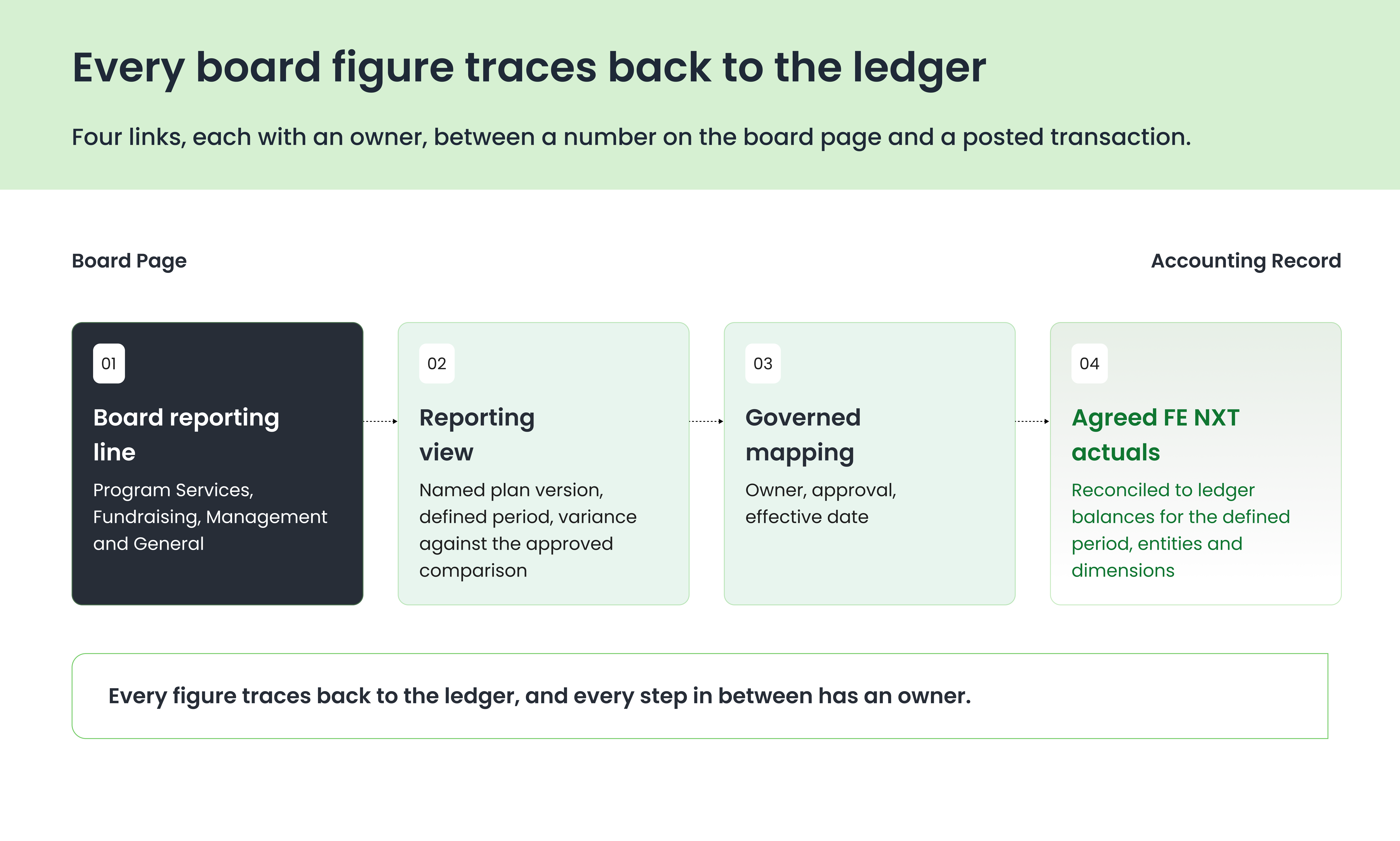
Limelight integrates with Blackbaud Financial Edge NXT and complements it. FE NXT is the general ledger and accounting system of record for the nonprofit. Limelight connects to the agreed FE NXT actuals and handles the planning and reporting work that finance usually does in spreadsheets, such as:
The two systems handle different parts of the workflow but work together:
|
Blackbaud Financial Edge NXT (accounting) |
Limelight (FP&A and reporting layer) |
|
Posted transactions and ledger actuals |
Connects to agreed FE NXT actuals |
|
Chart of accounts and accounting dimensions |
Governed reporting mappings and hierarchies |
|
Period close and accounting controls |
Budgets, forecasts, and scenarios |
|
Accounting classifications |
Actual-versus-plan views and variance analysis |
|
Historical accounting records |
Variance commentary and repeatable board packages |
How Limelight complements Financial Edge NXT
FE NXT’s role doesn’t change. It continues to govern:
Limelight builds on those actuals without changing posted transactions or reopening the close. Finance uses it to automate the work that usually happens in spreadsheets around the ledger:
Clear ownership helps finance track which team owns the accounting data, reporting structure, and explanations behind material variances.
|
Reporting activity |
Typical owner |
Responsibility |
|
Accounting actuals |
Accounting |
Maintain ledger integrity and complete the close |
|
Account-to-report mappings |
Finance/accounting |
Review how accounting detail is grouped for reporting |
|
Budget and forecast versions |
FP&A/finance |
Define the approved comparison and maintain plan versions |
|
Variance thresholds |
FP&A/finance |
Determine which differences require explanation |
|
Variance commentary |
Budget owners |
Explain operational causes and expected future impact |
|
Board report structure |
Finance |
Define views, metrics, and package design |
|
Final review and approval |
Finance leader/designated reviewer |
Confirm figures, commentary, and reporting version |
Reporting activities, owners, and responsibilities
A recurring reporting process needs clear controls around the data, mappings, plan versions, commentary, and final report. Finance should define who owns each step, what gets reviewed, and which version becomes the approved board report. This keeps the process consistent when Financial Edge NXT actuals, budgets, forecasts, and operational explanations are brought together each reporting period.
Document which Financial Edge NXT data, periods, entities, and dimensions feed the report. Identify the totals that must reconcile and the person responsible for resolving exceptions. Unmapped activity should remain visible until it is assigned correctly.
Name an owner for report mappings and establish how changes are proposed, reviewed, approved, and dated. New accounts, departments, programs, grants, or funds should enter the reporting model through that process rather than through an undocumented formula update.
Give every budget, forecast, and scenario a clear name, period, status, and owner. The board report should identify the selected comparison consistently. If management changes the forecast, preserve the prior version and document what changed.
Set criteria for which results require explanation. Assign each item to someone with the relevant operational knowledge, then define who reviews the commentary for financial consistency, clarity, and appropriate tone. Narrative ownership should be explicit rather than inferred from who answers an email first.
Define the review sequence and final approver. Keep the approved report and its supporting version according to the organization’s policies. Limit distribution appropriately, and make corrections through a documented process rather than silently replacing a file.
Governance makes a recurring report explainable. It gives finance a reliable answer when a board member asks where a figure came from, why it changed, or who approved the explanation.
Start with one recurring board report and trace it backward. For every page, identify the source actuals, filters, spreadsheet adjustments, account mappings, budget or forecast version, commentary owner, reviewer, and final approval. Mark every point where someone copies data, changes a formula, reclassifies a line, or moves an explanation between systems.
That map will reveal the first process worth moving into a governed reporting layer. It may be the account-to-board mapping, the actual-versus-plan view, or the collection of variance explanations. Solve the most fragile recurring handoff first rather than redesigning the full board package at once.
Ensure the final board report has a controlled path from posted actuals to management explanation. When that path is visible, finance can spend less of the reporting cycle reconstructing how the package was built and more of it helping leaders understand what the results mean.
Ready to replace manual reporting handoffs with a connected workflow?
Limelight helps finance teams bring reporting structures, budgets, forecasts, variance analysis, and narrative context into a recurring reporting process. Explore Limelight’s reporting capabilities to see how your nonprofit can move from exported accounting data to a more consistent, explainable board report.
Nonprofit fund accounting tracks financial activity according to the restrictions or purposes attached to funding, while the general ledger records the underlying financial transactions. A nonprofit may therefore need to report the same financial activity by fund, program, grant, or other dimension in addition to its overall financial results.
Restricted funds should be forecast according to the restrictions attached to the funding and the timing of eligible revenue and expenses. Finance should distinguish funds available for general operations from amounts that can only support specific programs or purposes when assessing future spending capacity.
A nonprofit cash flow forecast should typically show expected cash receipts, planned cash disbursements, timing differences between revenue and expenses, and the resulting cash position over the forecast period. Funding restrictions, grant payment schedules, payroll, and major program expenditures can materially affect the timing of cash availability.
The appropriate frequency depends on the nonprofit's operating cycle, funding volatility, and reporting needs. Organizations with significant changes in grants, program activity, staffing, or cash requirements may need to update forecasts more frequently than organizations with relatively stable operations.
Finance can forecast grant revenue and related expenses using the grant's funding amount, eligible spending requirements, expected payment timing, program activity, and remaining period. The forecast should distinguish committed funding from amounts that depend on future awards, renewals, or other conditions.
A nonprofit should evaluate whether the system supports its required fund and dimensional structures, financial reporting, budgeting, forecasting, grant or restriction tracking, integrations, audit requirements, and reporting workflows. The right configuration depends on how the organization manages funds and how much reporting work finance needs to perform outside the accounting system.
Subscribe to our newsletter