
%20(1).svg)
5 Essential Nonprofit Financial Dashboards for 2026
By Laks Satchi |
Last Updated: September 15, 2026
Nonprofit finance teams rarely struggle because they lack reports. The harder problem is getting the right financial signal in front of the right person before the next board meeting, grant review, or cash decision. That pressure is visible outside the finance team as well. In the 2025 Bank of America Study of Philanthropy, 62% of self-described philanthropic experts said they monitor and evaluate the impact of their giving, compared with 20% of affluent donors overall. The study surveyed 1,514 wealthy US households.
A good financial dashboard helps a nonprofit answer that demand for evidence without forcing every stakeholder to interpret a full financial package.
Nonprofit finance teams rarely struggle because they lack reports. The harder problem is getting the right financial signal in front of the right person before the next board meeting, grant review, or cash decision. That pressure is visible outside the finance team as well. In the 2025 Bank of America Study of Philanthropy, 62% of self-described philanthropic experts said they monitor and evaluate the impact of their giving, compared with 20% of affluent donors overall. The study surveyed 1,514 wealthy US households.
A good financial dashboard helps a nonprofit answer that demand for evidence without forcing every stakeholder to interpret a full financial package.
A nonprofit financial dashboard is a visual management view that brings selected financial metrics, trends, and exceptions into one place. It can display cash, budget variance, funding mix, expenses, net assets, and other measures without requiring leaders to work through a full ledger or static reporting package.
A dashboard is most useful when it sits on top of trusted accounting data and updates at a cadence that matches the decision being made. Some measures may refresh automatically as source data changes. Others may update nightly, weekly, or after the monthly close. Data currency matters more than the “real-time” label. Users should know how current the data is and whether they can trace a number back to its source.
That is where interactive dashboards differ from a conventional report. A report records and communicates a defined financial view. A dashboard is built for monitoring and investigation. Users should be able to see a trend, spot an exception, and, where permissions allow, drill into the detail behind it.
Dashboards are also different from formal financial statements. For US nonprofits that follow GAAP, FASB Topic 958 governs not-for-profit financial reporting. FASB's 2016 update changed the presentation of net asset classes and expanded information about expenses, liquidity, and the availability of resources. A management dashboard can mirror those distinctions, but it does not create compliance by itself. For a fuller explanation of the underlying reporting rules, see Limelight's guide to nonprofit accounting standards.
A useful nonprofit dashboard should do four things well:
For liquidity-sensitive decisions, a dashboard often works best alongside a structured cash flow forecasting process. The dashboard tells you where cash stands now. The forecast shows what happens next if receipts, grants, payroll, or major expenses shift.
A dashboard should start with the questions leadership needs to answer, then select the smallest set of KPIs that can answer them consistently. The same metric can be misleading if different teams calculate it differently, so finance should document each formula, data source, owner, and refresh cadence before automating the view.
|
Financial question |
KPI |
Calculation or definition |
What to watch |
|---|---|---|---|
|
Can we cover near-term obligations? |
Current ratio |
Current assets ÷ current liabilities |
A ratio above 1 means current assets exceed current liabilities, but restricted assets and slow receivables can still limit usable liquidity. |
|
How long could we operate without new revenue? |
Months of operating reserves |
Liquid resources available for operations ÷ average monthly operating expenses |
Use the definition in the organization's reserve policy. Avoid treating a generic three- or six-month target as universal. |
|
Are actual results tracking the plan? |
Budget variance |
Actual minus budget, or budget minus actual, using one documented sign convention |
Separate revenue and expense variances so a “favorable” sign cannot be misread. |
|
Are we too dependent on one funding source? |
Revenue concentration |
Share of total revenue from the largest donor, grant, contract, or source category |
A diverse-looking revenue mix can still hide dependence on one large funder. |
|
How are resources being used by function? |
Functional expense mix |
Program, management and general, and fundraising expenses as shares of total expenses |
Use a consistent allocation method. Do not assume a higher program percentage automatically means better organizational performance. |
|
How efficiently are we raising funds? |
Cost per dollar raised |
Fundraising expense ÷ contribution revenue for a defined channel or campaign |
Event revenue, restricted gifts, and campaign timing can distort comparisons if the denominator changes from period to period. |
|
What does program spending produce? |
Cost per outcome |
Program spending ÷ a defined outcome unit, such as meals delivered or clients served |
Keep the outcome definition stable and avoid comparing unlike programs only because both produce a per-unit figure. |
|
Are flexible resources strengthening? |
Change in net assets without donor restrictions |
Period-over-period movement in net assets without donor restrictions |
Review the trend with cash, receivables, commitments, and board-designated reserves rather than in isolation. |
Table: Nonprofit KPIs are most useful when each metric answers a specific financial question and uses a documented calculation.
A few of these measures need extra care. Budget variance, for example, is simple mathematically but easy to misread when revenue and expense signs are handled inconsistently. A documented budget variance analysis convention prevents a favorable expense variance from looking identical to a revenue shortfall.
Functional-expense ratios also need context. Administrative infrastructure, finance systems, fundraising capacity, and compliance work all cost money. A dashboard should help leaders understand whether those costs support the mission and operating model, not reward an artificially low overhead percentage. Limelight's guide to nonprofit operating expenses provides a more detailed breakdown of the expense categories behind those ratios.
Most nonprofits can cover their recurring finance questions with five dashboard views. They do not have to be five separate screens. A smaller organization may combine several views, while a larger nonprofit may split them by entity, fund, program, region, or grant. The useful distinction is the decision each dashboard supports.
|
Dashboard |
Primary question |
Core metrics |
Primary users |
|---|---|---|---|
|
Cash flow and liquidity |
Can we meet upcoming obligations with resources that are actually available? |
Cash on hand, unrestricted cash, receivables, payables, operating cash flow, reserve months |
CFO, controller, finance director, executive director |
|
Budget vs. actuals |
Where are we off plan, and why? |
Budget, actuals, dollar variance, percentage variance, forecast |
Finance, program leaders, department owners |
|
Revenue mix and sustainability |
How concentrated and predictable is funding? |
Revenue by source, recurring gifts, grant mix, concentration, timing |
CFO, development, executive team |
|
Functional expense |
How is spending distributed across mission delivery and support functions? |
Program, management and general, fundraising expenses, allocation trends |
Finance, executive director, board finance committee |
|
Board financial health |
What does the board need to know to govern and make decisions? |
Revenue vs. expenses, liquidity, net assets, liabilities, key variances, major funding risks |
Board, executive director, CFO |
Table: The five dashboard types separate day-to-day finance questions from program, funding, compliance, and board-level decisions.
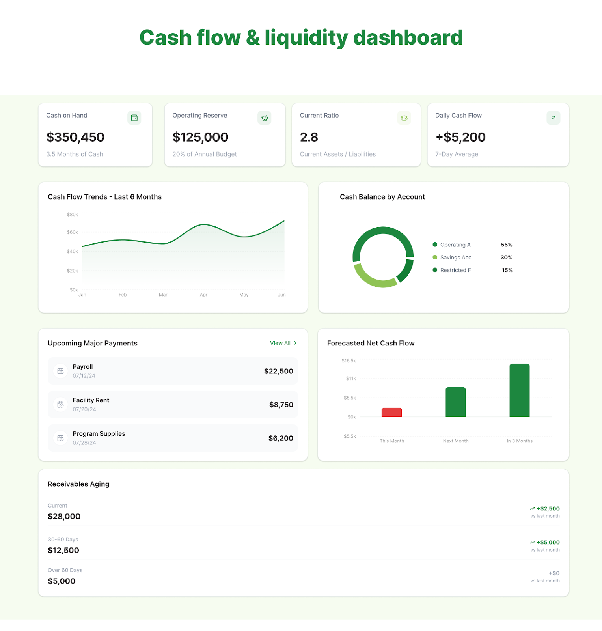
Image: Cash flow and liquidity dashboard tracking cash on hand, operating reserves, receivables, upcoming payments, and forecast cash flow.
A cash flow and liquidity dashboard answers the question that matters most when timing gets tight: what cash is available, what is due, and what could change the position over the next few weeks or months?
The view should separate bank balance from usable liquidity. A nonprofit can have cash in the bank while still facing a liquidity constraint if a large portion of that balance is donor-restricted, board-designated, or needed for near-term obligations.
Track:
Use it when: Finance needs to decide whether to delay discretionary spending, accelerate collections, draw on a line of credit, change the timing of a program expense, or flag a reserve-policy breach before it becomes a cash crisis.
Watch for: A total cash number that mixes restricted and unrestricted resources. If the board sees one large bank balance without availability context, the dashboard can create false confidence.
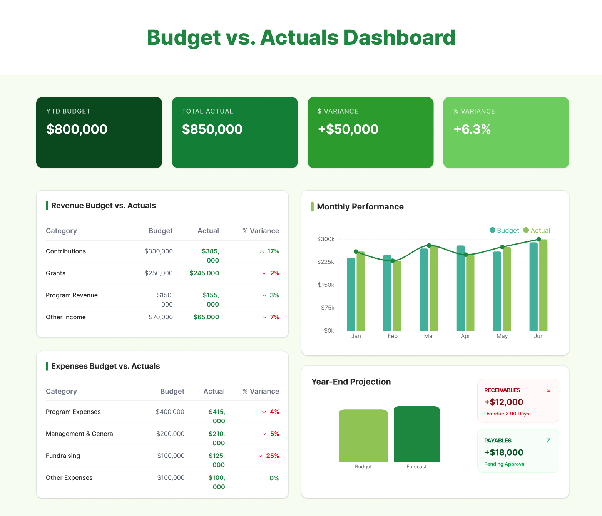
Image: Budget vs. actuals dashboard comparing year-to-date budget, actual results, variance, and year-end projections.
A budget vs. actuals dashboard is the working view for performance against plan. The best version does more than color a variance green or red. It helps finance and budget owners see where the variance sits, how material it is, and whether it changes the year-end outlook.
Track:
Use it when: A program manager needs to understand whether an underspend reflects a delayed activity, a staffing vacancy, or a permanent change. The same view can show whether higher-than-budgeted fundraising revenue is enough to offset an expense overrun elsewhere.
A strong nonprofit budgeting process makes this dashboard more useful because the comparison starts from a budget that reflects program plans, funding restrictions, and realistic timing assumptions.
Watch for: Variances without explanations. If every review ends with finance asking department owners why a number moved, the dashboard is only displaying the problem. Add comments, drivers, or linked details so users can explain material differences while they are still actionable.
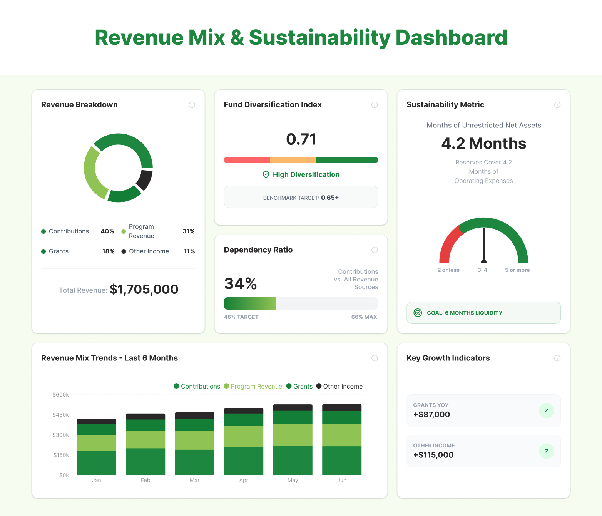
Image: Revenue mix and sustainability dashboard tracking funding concentration, dependency, unrestricted liquidity, and revenue trends.
A revenue mix dashboard shows where funding comes from, how concentrated it is, and how predictable the timing may be. That matters because two nonprofits with the same annual revenue can have very different risk profiles. One may rely on diversified recurring contributions. Another may depend on a small number of grants or contracts that renew at different times.
Track:
Use it when: Leadership is deciding how much cost growth the organization can support, whether a new program should depend on a single grant, or where development effort should shift before a major funding source expires.
Watch for: Treating recognized revenue as if it were cash. Grant revenue, pledges, reimbursements, and contract payments can hit the financial statements on a different schedule from cash receipts. Pair the revenue mix with the liquidity dashboard when timing is the decision.
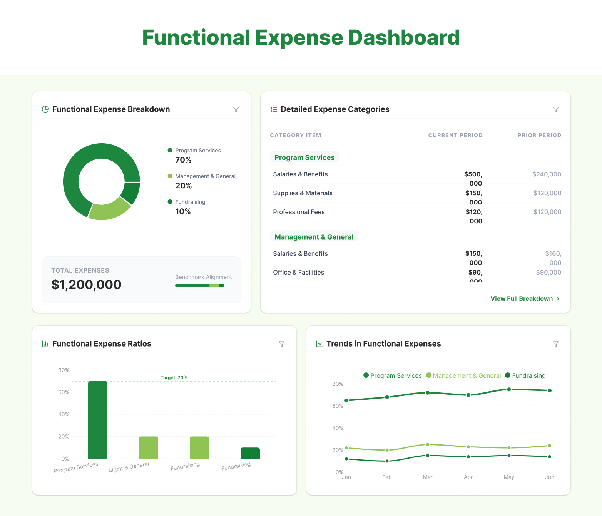
Image: Functional expense dashboard breaking spending into program services, management and general, and fundraising.
A functional expense dashboard helps leaders see how spending is distributed across mission delivery and organizational support. For US GAAP reporters, FASB's ASU 2016-14 update to Topic 958 improved expense and liquidity disclosures. Separately, the IRS 2025 Form 990 instructions require applicable filers completing Part IX to report expenses across program services, management and general, and fundraising columns.
A management dashboard should use the same underlying allocation logic wherever possible so internal reporting does not drift away from the numbers finance later needs to explain in formal reporting.
Track:
Use it when: The executive director or finance committee needs to understand why the functional mix changed. A rising management-and-general percentage may reflect a temporary systems investment, new compliance requirements, or a genuine cost-control issue. The dashboard should make that distinction visible.
Watch for: Using the program-expense ratio as a standalone quality score. A nonprofit can damage controls, staffing, technology, or fundraising capacity by minimizing support costs simply to improve a percentage.
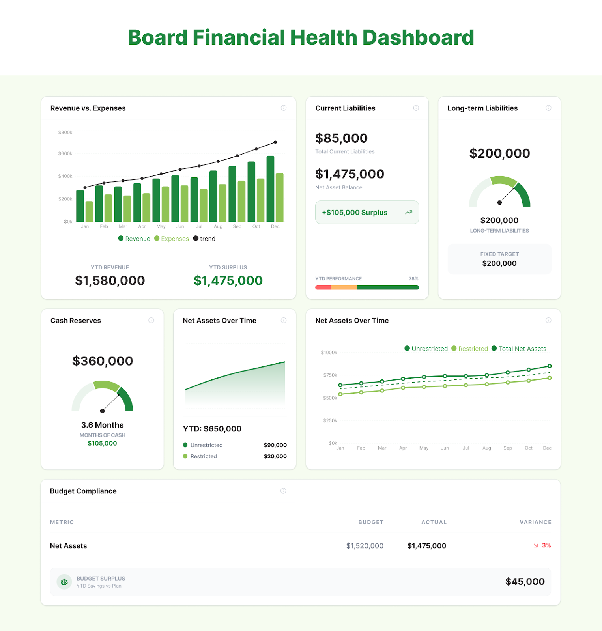
Image: Board financial health dashboard summarizing revenue, expenses, reserves, liabilities, net assets, and budget compliance.
A board dashboard is a governance view, not a compressed general ledger. Its job is to surface the financial conditions that may require oversight, a decision, or a change in strategy. The same figures feed the board reports finance prepares ahead of each meeting.
Track:
Use it when: The board is deciding whether to approve a new program, use reserves, add staff, change an investment or spending policy, or respond to a material funding change. The dashboard should help the board see the financial consequences of the decision without asking members to interpret account-level detail.
Watch for: Too many KPIs. A board dashboard should be small enough to discuss. If the page contains every ratio finance can calculate, the important signals get buried. Keep detailed schedules available as supporting material and use the dashboard for the issues that need governance attention.
Building the dashboard is the easy part. The harder work is agreeing on what each number means, where it comes from, who owns it, and what decision should follow when it moves. These six steps keep the dashboard tied to the operating process rather than turning it into another reporting artifact.
Start with the user and the decision. A CFO needs different details from a board member, program leader, or development director.
For each proposed dashboard, write down the decision it should support. “Board financial health” is too broad on its own. “Can the board approve a new two-year program without putting the reserve policy at risk?” is specific enough to determine which metrics belong on the page.
Document the calculation, sign convention, data source, refresh cadence, and owner for every KPI. This prevents two departments from using the same label for different math.
Reserve metrics deserve particular attention. Define which liquid assets count, which obligations are excluded or included, and which expenses form the monthly denominator. The same rule applies to fundraising efficiency, program ratios, and cost-per-outcome measures.
If the organization is still formalizing its budget structure, a nonprofit budget template can help standardize revenue, expense, and functional categories before those categories are pushed into a dashboard.
Identify where each metric originates. Typical sources include the accounting or ERP system, donor CRM, grant-management system, payroll or HRIS platform, and operational systems that hold program-output data.
Then map the dimensions needed for analysis. Finance may need to slice the same expense by entity, department, fund, program, grant, location, or project. If those dimensions are inconsistent in the source systems, a dashboard will make the inconsistency more visible rather than fix it.
Put the decision-level metrics on the first view, then decide what detail should sit behind them. A board member may stop at a trend and an explanation. A finance analyst may need to drill from that trend to the fund, account, and transaction level.
Use charts only where they make change easier to see. A trend line is useful for reserves. A stacked bar may work for revenue mix. A simple table is often better for a short list of material budget variances.
Different decisions need different refresh cycles. Cash and collections may justify daily or near-real-time data. Budget variance often follows the monthly close. Board views should match the board-meeting cycle but still flag material changes between meetings when needed.
Assign an owner to each dashboard and set thresholds for review. An alert should mean something. If every small variance triggers a notification, users learn to ignore the system.
The fastest way to find weak metrics is to use the dashboard in the meeting it was designed for. Note which numbers create useful discussion, which labels require explanation, and which questions force the team back into a spreadsheet.
Then revise the view. A strong dashboard reduces the time between a financial change and a well-informed decision. Extra widgets do not help if they slow that process down.
A dashboard tool should fit the finance workflow that already exists and remove a specific reporting bottleneck. The evaluation should therefore start with your source systems, reporting requirements, users, and governance needs, not with a feature checklist copied from vendor websites.
If the underlying accounting platform is still being selected, compare that first. Limelight's guide to nonprofit accounting software covers common accounting-system requirements that sit upstream of dashboarding.
|
Criterion |
Questions to test during evaluation |
|---|---|
|
Data integration and refresh |
Which of our ERP, accounting, CRM, payroll, and grant systems connect directly? How often does each source refresh? What happens when a sync fails? Can finance see the last successful refresh time? |
|
Finance ownership |
Can finance create or modify views without IT? Can we add dimensions, calculations, filters, and KPI definitions ourselves? Are there usable pre-built templates for our recurring planning and reporting work? |
|
Drill-down and reporting depth |
Can users move from a KPI to the report, account, fund, grant, or transaction behind it? Can the same data feed dashboards and formal management or board reporting? |
|
Permissions and distribution |
Can the tool restrict access by role, entity, department, or other dimension? Can board viewers see summaries without gaining unnecessary access to sensitive detail? How are reports exported or distributed? |
|
Implementation and total cost |
What is included in subscription pricing? What costs extra for connectors, implementation, training, support, storage, viewers, or additional entities? Who owns data mapping and migration? |
Table: A useful dashboard-tool evaluation tests the finance workflow, data controls, and implementation burden rather than comparing feature counts alone.
A demo should use your own workflow whenever possible. Ask the vendor to build or reproduce one high-value view, such as budget vs. actuals by program or a board liquidity page. Then test how many steps it takes to trace a variance, change a filter, add a new reporting dimension, and explain the number to a non-finance user.
That exercise exposes trade-offs that a generic product tour will miss. A tool can have attractive charts and still create work if finance must export data manually, depend on consultants for every model change, or maintain a second reporting process for the board.
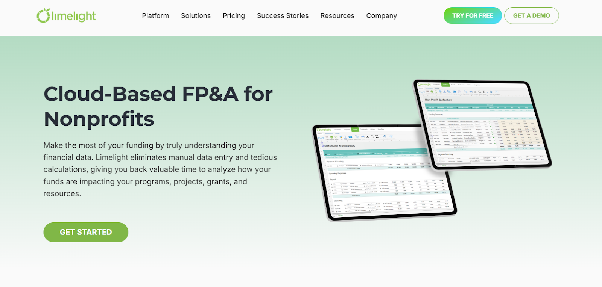
Image: Limelight's nonprofit FP&A page highlights connected planning, reporting, and financial-management workflows.
Limelight positions its platform around connected planning, reporting, and dashboard workflows for finance teams. For nonprofits, the relevant question is whether those capabilities reduce the manual work described earlier while preserving the fund, program, grant, and reporting dimensions the organization needs.
Limelight's page for nonprofit finance teams describes a centralized finance workspace with templates for grants, funds, projects, programs, and workforce planning. That matters when dashboard users need the same program or funding dimensions across budgets, forecasts, and reports instead of reconciling separate files.
The broader Limelight FP&A platform page lists integrations with Sage Intacct, Microsoft Dynamics, and NetSuite, among other systems. Finance teams evaluating Limelight should still confirm the exact connector, data scope, and refresh behavior for their own ERP configuration during implementation.
Limelight's dashboard product demo describes real-time interactive dashboards with automatic updates and filters. Its reporting page adds drill-down and drill-through from dashboards to accounts, departments, funds, business units, and transaction detail.
That combination is useful when a board or executive view raises a question that finance needs to answer immediately. The dashboard can remain concise while the supporting detail stays available behind the metric instead of being copied into a separate spreadsheet.
Limelight AI includes AI Insights for variance explanations, trend analysis, and anomaly detection, plus a natural-language assistant for questions inside reports. For a nonprofit finance team, the practical use is narrower than “AI analytics.” It can reduce the manual first pass of identifying which accounts, departments, or periods drove a material change before finance adds the operational explanation.
Human review still matters. A variance explanation can identify what moved in the financial data, but program owners and finance leaders still need to determine why it moved and whether the response should be operational, financial, or both.
Limelight's International Medical Corps case study describes an organization with 7,000 staff across 80 countries and six continents that had financial and operational information spread across spreadsheets and time zones. The case study reports that IMC centralized budgets, expenses, and reports in one workspace, which made information more readily available to senior management and supported faster decisions.
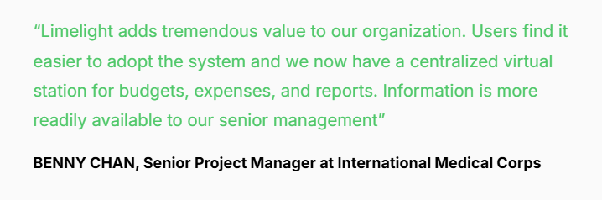
Image: International Medical Corps describes using Limelight as a centralized workspace for budgets, expenses, and reports.
The case is relevant because the problem is not a missing visualization. It is fragmented finance data and delayed access to context. A dashboard has more value when it is the visible layer of a connected planning and reporting process.
See how the workflow would apply to your own nonprofit data in a Limelight demo.
The questions below address implementation and governance issues that are easy to miss when teams focus only on the dashboard design.
The refresh cadence should match the decision. Cash, collections, and short-term liquidity may need daily or near-real-time updates. Budget variance usually follows the monthly close, while board dashboards often follow the meeting cycle. The dashboard should display when the underlying data was last refreshed so users do not mistake a scheduled update for a live figure.
They can use the same underlying data, but the views should usually differ. Finance needs drill-down detail, account-level investigation, and operating exceptions. The board needs a smaller set of trends, material variances, liquidity measures, funding risks, and decisions requiring governance. Role-based views reduce clutter without creating separate versions of the financial truth.
No. A dashboard is a management and monitoring tool. It can support monthly reviews, board discussions, and variance investigation, but it does not replace GAAP financial statements, Form 990 reporting, grantor-required reports, or audited financial statements. The dashboard should reconcile to the underlying accounting records and use definitions that remain consistent with formal reporting.
Show resources with donor restrictions separately from resources available for general expenditure whenever that distinction affects the decision. For example, a liquidity dashboard should not present the total bank balance as fully available if part of the balance is tied to donor-restricted purposes. Board-designated reserves should also be identified separately because board designation is not the same as a donor restriction.
Subscribe to our newsletter