
Financial Planning & Analysis

By Jade Cole |
Last Updated: October 08, 2026
Best Financial Modeling Software: Top 6 Tools for 2026
Best Financial Modeling Software: Top 6 Tools for 2026
By Jade Cole |
Last Updated: October 08, 2026
Most finance teams can build a financial model. The harder part is keeping that model trustworthy once actuals arrive, assumptions change, department owners revise inputs, and leadership asks for another scenario before the next meeting.
For financial planning and analysis teams, the best financial modeling software is therefore less about adding more formulas. It needs to keep source data, assumptions, scenarios, approvals, financial forecasts, and reports tied to the same planning process.
This guide compares six platforms around the decisions that matter in practice: who owns the model, how dependent the workflow is on spreadsheets, how planning and reporting connect, what the software costs, and what level of governance it can support.
Pricing and G2 data below reflect publicly available information checked in September 2026. Public starting prices establish a useful baseline, but they may not include implementation, integrations, training, support, or additional environments.
|
Software |
Best for |
Modeling and planning approach |
Starting price |
G2 rating |
|
Mid-market FP&A teams that want finance-owned models connected to enterprise resource planning (ERP) actuals |
Finance-owned modeling, connected planning, scenarios, reporting, and dashboards |
Starter and Unlimited plans. Dollar pricing is not publicly displayed |
||
|
Cube |
Finance teams that want to keep Excel or Google Sheets as a primary working surface |
Centralized planning connected to spreadsheet, web, and collaboration workflows |
Custom quote across Bronze, Silver, and Gold plans |
|
|
Jirav |
Smaller and growing finance teams that need budgeting, forecasting, and three-statement planning |
Driver-based budgeting, forecasting, scenarios, reporting, and cash-flow planning |
$10,000/year for Starter and $15,000/year for Pro |
|
|
Oracle Cloud EPM Planning |
Enterprises with complex planning structures, formal approvals, and broader EPM requirements |
Configurable planning applications, Strategic Modeling, scenario analysis, and enterprise workflows |
Quote-based. Confirm current Cloud EPM pricing with Oracle |
|
|
Anaplan |
Large organizations connecting finance plans with operational planning across functions |
Enterprise connected planning with multidimensional models and scenario analysis |
Custom quote |
|
|
Vena |
Finance and accounting teams that want to retain an Excel-native planning experience |
Excel-based planning connected to a centralized database, workflows, and reporting |
Professional and Complete plans. Contact sales for pricing |
This comparison focuses on recurring corporate-finance work: budgeting, forecasting, financial modeling, scenario analysis, actuals-to-plan reporting, collaboration, approvals, model governance, and connections to source systems. Product capabilities and current pricing were checked against first-party vendor information. G2 is used for rating and review-count data rather than as the source for product capabilities or commercial terms.
Limelight publishes this article and appears in the comparison. It is disclosed rather than hidden behind a scoring system. The six tools are numbered for navigation, not as a 1-to-6 performance ranking.
Financial modeling is a broader activity than FP&A. A model might be built for an acquisition, valuation, financing decision, new product launch, capital investment, or another one-time decision. Excel can remain perfectly appropriate for many of those models.
FP&A software becomes more relevant when the model has to survive repeated planning cycles.
A corporate finance team may need to load actuals every month, update assumptions, collect departmental inputs, maintain several forecast versions, compare scenarios, control access, explain variances, and turn the same underlying model into management reports. At that point, the problem is no longer simply whether the formulas work.
The harder questions are operational:
That is where purpose-built FP&A platforms add structure around the financial model.
The six platforms below solve different versions of the same problem. Some preserve the spreadsheet as the finance team's main interface. Others move more of the model, workflow, and reporting process into a dedicated planning environment.
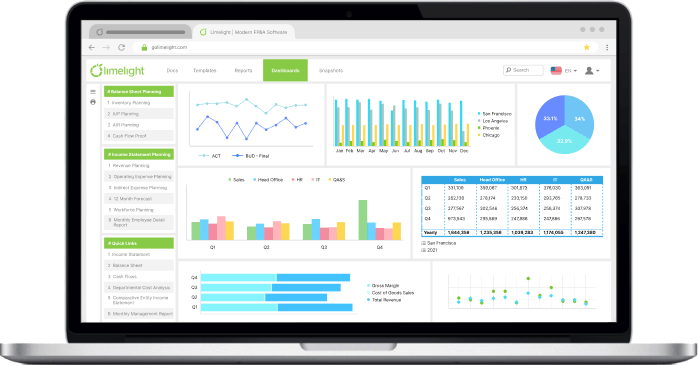
Limelight is built for mid-market FP&A teams that want finance to own the model while keeping planning, forecasting, scenarios, and reporting connected to financial and operational data.
Best for: Mid-market FP&A teams that want a finance-owned planning model connected to ERP actuals and recurring management reporting.
Capabilities
Considerations
Limelight offers Starter and Unlimited plans but does not display a dollar amount. Its G2 review sample is also smaller than those of Anaplan, Vena, Cube, and Jirav, so the star rating should be considered alongside the review count.
Pricing: Starter and Unlimited plans. Confirm current subscription, implementation, and support costs directly with Limelight.
G2 rating: 4.7/5 from 15 reviews
Cube is a natural candidate for finance teams that are comfortable in spreadsheets and do not want software selection to force an immediate change in that working habit.
It connects planning and reporting workflows to Excel and Google Sheets while maintaining a centralized model and data layer behind those interfaces.
Best for: FP&A teams that want more control around spreadsheet-based planning without abandoning Excel or Google Sheets as day-to-day working tools.
Capabilities
Considerations
Spreadsheet continuity is the point of the product. That is useful when finance wants to preserve familiar working methods, but teams whose main goal is to reduce spreadsheet dependence should test how much of their regular planning process would still happen there.
Pricing: Cube currently offers Bronze, Silver, and Gold plans with custom pricing.
G2 rating: 4.5/5 from 147 reviews
Jirav is aimed at growing finance teams that need a structured planning system without the footprint of a large enterprise EPM implementation.
Its planning model covers the income statement, balance sheet, and cash flow, which makes it particularly relevant when the forecast needs to extend beyond a profit-and-loss view.
Best for: Smaller and mid-sized finance teams that need recurring budgets, forecasts, scenarios, and three-way financial planning.
Capabilities
Considerations
Jirav's published tiers have different limits for planning horizon, users, departments, dashboards, custom tables, and active scenarios. A team that needs departmental or long-range planning should compare those limits before treating the Starter price as its likely cost.
Pricing: Starter is currently $10,000/year. Pro is $15,000/year. Enterprise pricing is quote-based.
G2 rating: 4.7/5 from 195 reviews
Oracle Fusion Cloud Enterprise Performance Management (EPM) Planning is built for organizations where financial planning forms part of a larger enterprise planning and governance environment.
Its scope can extend from financial planning into workforce, capital, projects, strategic modeling, approvals, and other EPM processes.
Best for: Enterprises with complex planning structures, multiple entities or planning processes, formal approval requirements, and an existing need for enterprise-scale EPM.
Capabilities
Considerations
Buyers should confirm which predictive, AI, and Intelligent Performance Management capabilities are included in the subscription they are evaluating. They should also scope the internal or consulting resources required to configure and administer the environment.
Pricing: Quote-based. Oracle does not provide a simple self-service price for a typical Planning deployment on the current product pages, so buyers should confirm current Cloud EPM commercial terms directly with Oracle.
G2 rating: G2 continues to list the product under its older Oracle Planning Cloud name at 4.2/5 from 64 reviews.
Anaplan is designed around connected planning across multiple business functions. Finance can model financial outcomes while connecting assumptions from areas such as sales, workforce, supply chain, and operations.
That breadth becomes relevant when planning has grown into a cross-functional operating process rather than a finance-only forecast.
Best for: Large organizations that need financial and operational plans to interact across several teams and planning models.
Capabilities
Considerations
Flexibility creates an implementation question of its own. Organizations should define who will design, maintain, and govern models before selecting Anaplan rather than treating platform configurability as a substitute for model ownership.
Pricing: Anaplan does not publish a standard list price for the platform. Buyers need a custom quote based on their deployment.
G2 rating: 4.6/5 from 481 reviews
Vena takes a different route from platforms that try to move finance away from Excel. It keeps Excel as a core user interface while adding centralized data, modeling, workflows, permissions, reporting, and collaboration around it.
For an Excel-heavy finance team, that can reduce the amount of process change required during adoption.
Best for: Finance and accounting teams that want to preserve an Excel-based working experience while putting more control around recurring planning and reporting.
Capabilities
Considerations
Whether Excel remains an advantage depends on why the company is buying FP&A software. If the goal is to keep finance productive in familiar spreadsheets while gaining control around them, Vena fits that requirement. If the goal is to reduce spreadsheet dependence itself, test how much of the normal workflow still relies on Excel.
Pricing: Vena currently offers Professional and Complete packages. Public dollar prices are not displayed, so buyers need to contact Vena for commercial terms.
G2 rating: 4.5/5 from 482 reviews
The subscription price is only one part of an FP&A software budget. Implementation, data migration, integrations, training, model design, support, administrative capacity, and additional environments can change the real cost considerably. The FP&A software pricing guide covers those cost drivers in more detail.
There is also a meaningful difference in how much pricing these vendors disclose.
Jirav provides the clearest corporate-plan prices in this group, with Starter at $10,000/year and Pro at $15,000/year.
Cube publishes Bronze, Silver, and Gold plans but requires a quote. Vena publishes Professional and Complete packages without dollar amounts. Anaplan does not publish a standard platform price. Oracle buyers should also confirm current Cloud EPM commercial terms directly with Oracle rather than relying on older public price sheets or third-party estimates.
Limelight's pricing page lists Starter and Unlimited plans and explains the included capabilities, but it does not currently display a dollar amount.
For a useful comparison, ask every shortlisted vendor for the same commercial scope: subscription, required users, implementation, integrations, training, ongoing support, sandbox or test environments, and any add-on modules.
Otherwise, you may end up comparing a base license from one vendor with an implementation-inclusive proposal from another.
Vendors add terminologies like “AI-powered,” “AI-assisted,” and “AI-supported” to different features, including forecasting, anomaly detection, natural-language querying, commentary generation, and planning assistance.
The better question is what the AI is allowed to do inside the finance workflow.
Limelight AI, for example, supports AI-assisted analysis around variances and anomalies, natural-language interaction with financial information, and forecasting use cases. Oracle offers predictive and Intelligent Performance Management capabilities within its EPM portfolio. Vena includes AI functionality in its current product packages, while Cube now includes finance-focused AI agents and MCP access across its platform plans.
The following four AI capabilities matter:
Can finance see the source data and assumptions behind an AI-generated answer?
A forecast or explanation is difficult to defend if the team cannot trace how the system arrived at it.
Does the AI respect the same role and data-access controls as the underlying platform?
Giving an AI assistant broader access than the user asking the question creates a governance problem, regardless of how useful the output appears.
Can finance inspect, challenge, or override the output before it affects a forecast or report?
AI can shorten analysis time. It should not turn a suggested assumption into an approved planning input without the controls the organization normally requires.
Is the capability included in the quoted plan, restricted to another tier, or sold separately?
Two vendors can both advertise AI while including very different functionality in the package a buyer is actually evaluating.
AI can shorten parts of the analysis cycle. It does not remove finance's responsibility for the assumptions, source data, controls, and decisions built on that analysis.
Software selection gets easier when the team starts with its planning process instead of the vendor demo. Map how a forecast is built today, where actuals come from, who changes assumptions, which outputs leadership expects, and where the current process breaks.
Then evaluate the software against those requirements.
Start with the model itself.
Ask who can create dimensions, modify formulas, add drivers, change hierarchies, introduce a new scenario, and maintain calculation logic after implementation.
A platform can be highly configurable and still create a bottleneck if every normal finance change requires a specialist.
The required modeling depth also depends on the business. A straightforward departmental expense plan needs less flexibility than revenue modeling across products, locations, customers, currencies, channels, and operational drivers.
For teams that forecast from operational assumptions, check whether the software supports driver-based planning at the level of detail the business actually uses.
List the systems that provide financial or operational data before reviewing connectors.
That commonly includes the ERP, payroll platform, human resources information system (HRIS), customer relationship management (CRM) system, billing platform, data warehouse, and other operational tools.
A connector logo does not tell you whether the integration provides the right entities, dimensions, transaction detail, refresh frequency, or drill-through capability.
Finance should know what enters the model, how often it updates, who owns mapping changes, and how a user traces a reported number back to its source.
Test how the platform handles budget versions, rolling forecasts, assumption changes, scenario copies, departmental inputs, and forecast updates after actuals arrive.
Scenario planning should make it possible to change the assumptions that matter without rebuilding the model.
Reporting deserves the same scrutiny. Finance should be able to compare actuals, budget, and forecast, investigate the reason for a gap, and update management reporting when assumptions change.
That is where budget variance analysis becomes part of the operating workflow rather than a separate spreadsheet exercise.
More contributors create more opportunities for conflicting assumptions and uncontrolled changes.
Check role-based access, workflow approvals, version history, audit trails, locking, assignment tracking, comments, and ownership. Then test those controls with the people who will actually participate in budgeting and forecasting.
A technically sophisticated model can still fail as a planning system if finance cannot tell who changed an input, which version leadership approved, or whether two departments are working from the same assumptions.
Map the implementation work required to rebuild or migrate the current model, connect source systems, load historical data, create reports, establish permissions, train contributors, and support the platform after go-live.
The cheapest license can become the more expensive choice if it requires substantial consulting or internal administration. The reverse can also happen. A higher subscription price may make sense when it removes recurring manual work or reduces the resources needed to maintain the planning environment.
The useful comparison is total operating fit, not license price in isolation.
The shortlist should follow the way the finance team actually works rather than a generic feature ranking.
The shortlist should get smaller once the team maps its actual model, integrations, contributors, reports, approval process, and implementation capacity. A polished demo cannot compensate for a mismatch in those fundamentals.
See Limelight in action and test it against your planning workflow.
Use one of your own planning workflows instead of relying only on the vendor's prepared example.
Ask the vendor to show how actuals enter the model, how an assumption changes, how a new scenario is created, how a department submits an update, how a variance is investigated, and how the change reaches a management report.
That sequence reveals more about day-to-day fit than a feature tour.
It does not have to.
Some teams intentionally keep Excel as an analysis or reporting surface while moving governed data and recurring planning processes into an FP&A platform. Others want to reduce spreadsheet dependence more aggressively.
The right setup depends on which spreadsheet workflows remain useful and which ones create version, control, or maintenance problems.
Migrate enough history to support the comparisons, seasonality, driver analysis, and forecasting methods the team actually uses.
More history is not automatically better. Loading years of data that finance never analyzes can add mapping and validation work without improving the model.
Prioritize the systems that drive the model.
The ERP is usually central because it provides financial actuals, but payroll or HRIS data may matter just as much for workforce planning, while CRM or billing data may drive revenue forecasts.
Evaluate data depth, refresh behavior, mapping, and traceability rather than counting connector logos.
Read the rating and the sample size together.
A high score based on a small number of reviews does not provide the same breadth of user evidence as a similar score based on several hundred reviews. Review recency, company size, user role, and recurring feedback themes can also be more useful than a small difference in the average star rating.
Subscribe to our newsletter